Create a Cisco Webex Calling Adapter
The Cisco Webex Calling Adapter connects the Interaction Capture Service to the Cisco Webex Calling, and receives audio.
Before you begin
Create the Cisco Webex Calling Data Source
Procedure
-
In Recorder Manager, go to General Setup. Under Integration Service, click Settings.
-
Click Create, then select Cisco Webex Calling Adapter.
-
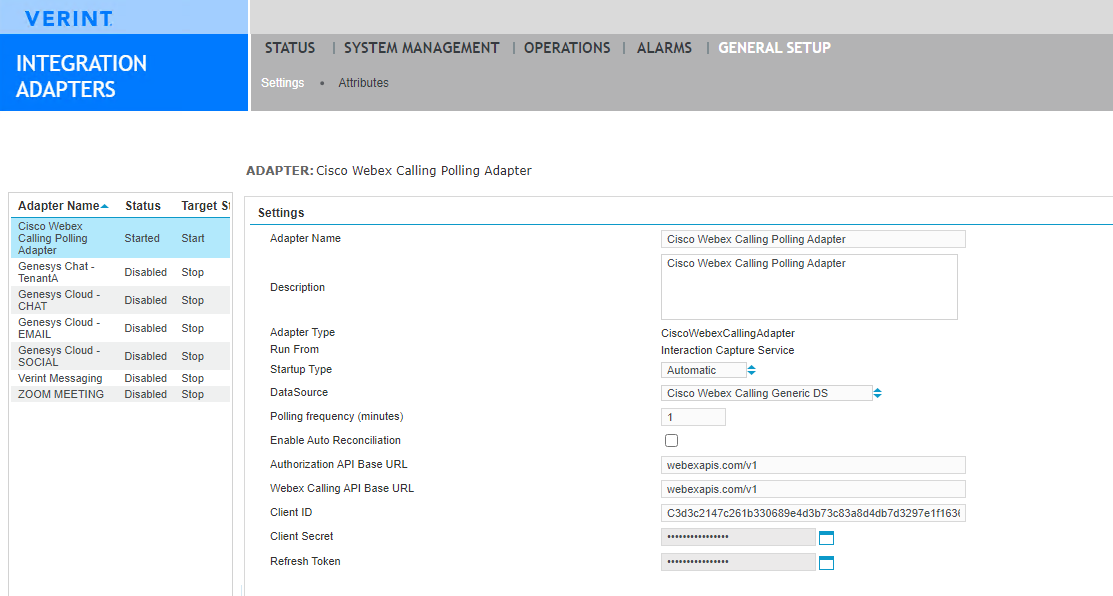
Complete the following mandatory parameters:
Field
Description
Adapter Name
Enter a unique name for this adapter. Do not use the special characters
< > $ & ' ", which are reserved for XML tagging.Description
Displays the full name of the adapter. Add details about your integration and tenant.
DataSource
Select the Application data source created for Cisco Webex Calling.
-
If your Service Provider advises it, then configure the following parameters:
Field
Description
Startup Type
How the adapter behaves after the host server restarts.
-
Automatic: (Default) The adapter starts automatically when the host
-
Manual: The adapter starts only when a user clicks the Start button.
-
Disabled: The adapter does not run when the host server starts.
Polling Frequency (minutes)
How often the adapter requests closed interactions from the Webex Calling. The default is 5 minutes.
Enable Auto Reconciliations
Select Enable Auto Reconciliation to automatically run call recovery daily at midnight and after the Cisco Webex Calling adapter restarts.
Authorization API Base URL
The base URL (without schema) of the Cisco Authorization API.
Webex Calling API Base URL
The base URL (without schema) of the platform API for the cloud region where your instance of Cisco Webex Calling is located.
Client ID
The Client ID for the Cisco OAuth app that is registered for Verint interaction capture.
Client Secret
The Client Secret for the Cisco OAuth app that is registered for Verint interaction capture.
Refresh Token
The refresh token that is used to generate a short-lived access token that allows Verint to access the Webex Calling API.
-
-
Click Save.
-
If you have a secondary Recorder, repeat this procedure to create another Adapter.
What to do next