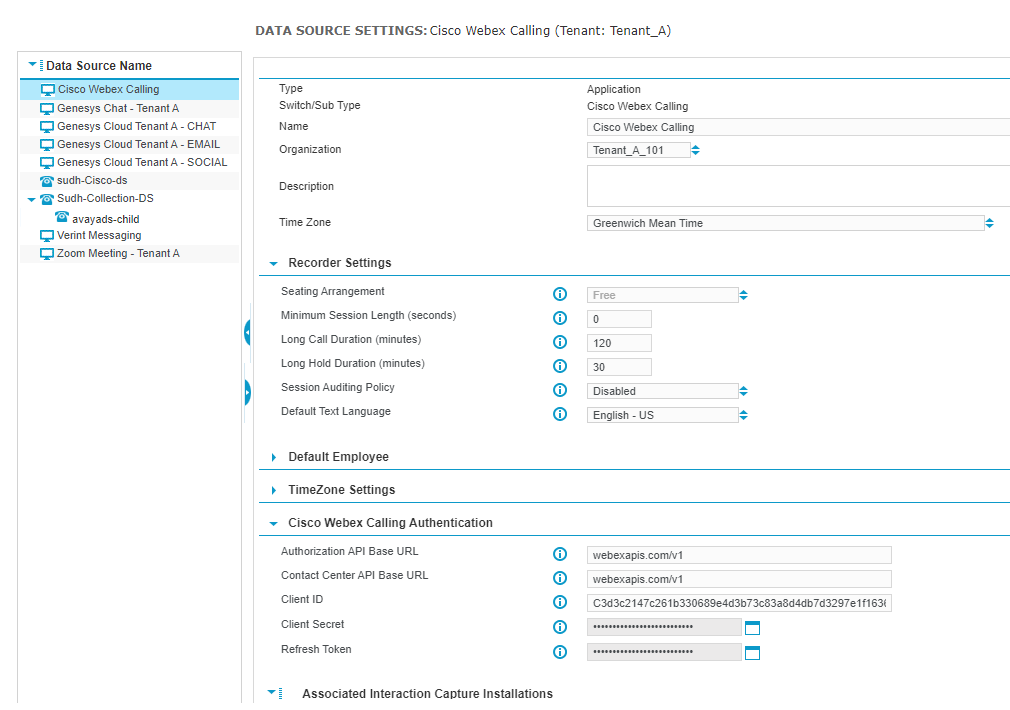
Settings for the Cisco Webex Calling Data Source
The following settings are for the Cisco Webex Calling Data Source, which is an Application data source.
Name: Enter a unique name that identifies this data source. Omit the characters < > & ’ and ”, which are reserved for XML tagging.
Organization: Specify the Organization to which you want to associate the data source.
In a multi-tenant environment, if the selected organization is associated to a tenant, the data source is also associated to that same tenant. In this scenario, when you click Save to save the data source, the tenant name of the organization that is associated to the data source is displayed in the screen heading. The data source can be associated to a particular tenant or have the Shared status. A data source associated to a particular tenant processes data only for that tenant. A data source that has the Shared status processes data for all tenants in the system.
Description: Optional. Enter a description of the data source.
Time Zone: Select the same time zone that is set for Enterprise Manager and Recorder Manager (in Preferences).
Recorder Settings
Seating Arrangement: For Application data sources, the Seating Arrangement is Free and cannot be changed. Free Seating indicates that employees do not have permanently assigned workstations. They are assigned an Employee ID and can sign in from any location in the call center.
Minimum Session Length (seconds): To prevent the retention of calls that are so short they are unlikely to contain usable data, specify a Minimum Session Length in seconds.
-
Calls (from connected to closed) that are shorter than the minimum session length are deleted.
-
Set to 0 (zero) to retain all calls regardless of their duration.
-
The maximum is 3600 seconds (one hour).
-
Applies to active CTI Sessions or VOX Sessions.
To retain Inactive CTI Sessions, use the Session Auditing Policy setting.
Long Call Duration (minutes): Specifies the length of a call, in minutes, after which the system triggers an alarm. The system also stops tracking the call from a CTI perspective, so in CTI-controlled application or performance mode environments this may cause loss of captured interactions. Enter any number between 1 and 1440 (24 hours)—an alarm is raised in the cases where calls exceed this number of minutes. The default is 120 minutes.
The Integration Service runs maintenance checks every five minutes to close calls that last for more than the length of time specified as the Long Call Duration. An alarm indicates that a call was closed because it was too long. These maintenance checks are not run more frequently to avoid imposing an extra load on the system. Therefore it may take up to five minutes to close a long call after it has passed the defined Long Call Duration threshold.
Long Hold Duration (minutes): Specifies the maximum duration of a single hold in minutes. Any holds over this duration raise an alarm. Enter any number between 1 and 3000, representing the number of minutes. The default is 30.
Session Auditing Policy: Choose the type of session (interaction) to mark and keep. Captured employee segments that are marked by an auditing policy appear in playback after all Interactions in the related Contact are closed, after a delay of up to five minutes. You can search for these types of interactions in the Portal.
-
Disabled (default) only marks sessions that contain some kind of content.
-
Missed Recordings marks interactions that should have been captured, but were not.
-
Full Switch marks the sessions that have CTI without captured interaction. For example, calls that were blocked, or interception calls that were met with a busy tone or unanswered ringtone.
TimeZone Settings
Local Time Tagging Mode: Select one of the following options from the list:
-
Organization—to base tagging on the organization. This is useful in scenarios where employees are working in different regions, allowing you to unify tagging across multiple time zones. If you select Organization, it is still necessary to specify the correct time zone for the data source. This is used in fallback selection for monitored extensions without an associated Employee or Profile (that is, extensions that don't belong to an employee).
-
Data Source—to base tagging on the time-zone specified earlier, where you selected a time zone from the Time Zone drop-down list.
Cisco Webex Calling Authentication
Authorization API Base URL: Enter webexapis.com/v1, which is the base URL of the Authorization API that is used to generate security tokens. The tokens allow Verint to access to the Cisco Webex Calling platform.
Webex Calling API Base URL: The base URL webexapis.com/v1 of the platform API for the cloud region where your instance of Cisco Webex Calling is located.
Client ID: The Client ID for the Cisco OAuth app that is registered for Verint interaction capture.
Client Secret: The Client Secret for the Cisco OAuth app that is registered for Verint interaction capture.
Refresh Token: The refresh token that is used to generate a short-lived access token that allows Verint to access the Webex Calling API.
The Verint adapter regularly retrieves the refresh token, which automatically refreshes the access token before it expires. The access token usually expires in 12 hours. Each time the tokens are retrieved, their expiration resets to the initial value. Refreshing the token reduces the overall volume of Authentication API requests made to the Cisco Webex Calling API.
Associated Installations
Associated Interaction Capture Installations: Select the server role that will provide the Interaction Capture services for this data source. The Interaction Capture Service retrieves the media recorded by the external system, which can include post-call audio depending on the capabilities of the external system.
Associated Integration Service Installations: Select the server role that will provide the Recorder Integration Service for this data source. The integration service captures media in real-time, such as agent screen activity.