Subscribe to the Five9 VoiceStream
For the Verint Recorder to communicate with the Name of the External System, create a subscription on the VoiceStream self-service admin portal. You will get a Subscription ID and API key, which is required to configure the Verint External System Data Sourcedata source.
The following process describes how to create a Five9 VoiceStream subscription for the first time.
Before you begin
-
Get the following information:
-
The URL for the Five9 VoiceStream self-service admin portal.
-
The sign-in credentials of an administrator-level user for the Five9 VoiceStream portal.
-
-
Configure the data source, the SIP Proxy adapter, and the Five9 VoiceStream Webhook adapter.
-
Get the following information from Verint support (or your service provider):
-
The fully qualified domain name (FQDN) of the Verint server that hosts the Recorder Integration Service. It is the HTTP Alias configured on the Recorder node.
-
The trust token configured on the data source
-
The port number configured on the SIP Proxy Adapter.
-
Procedure
-
Access the Five9 Voice Stream self-service admin portal for your domain.
-
Create a new Subscription.
-
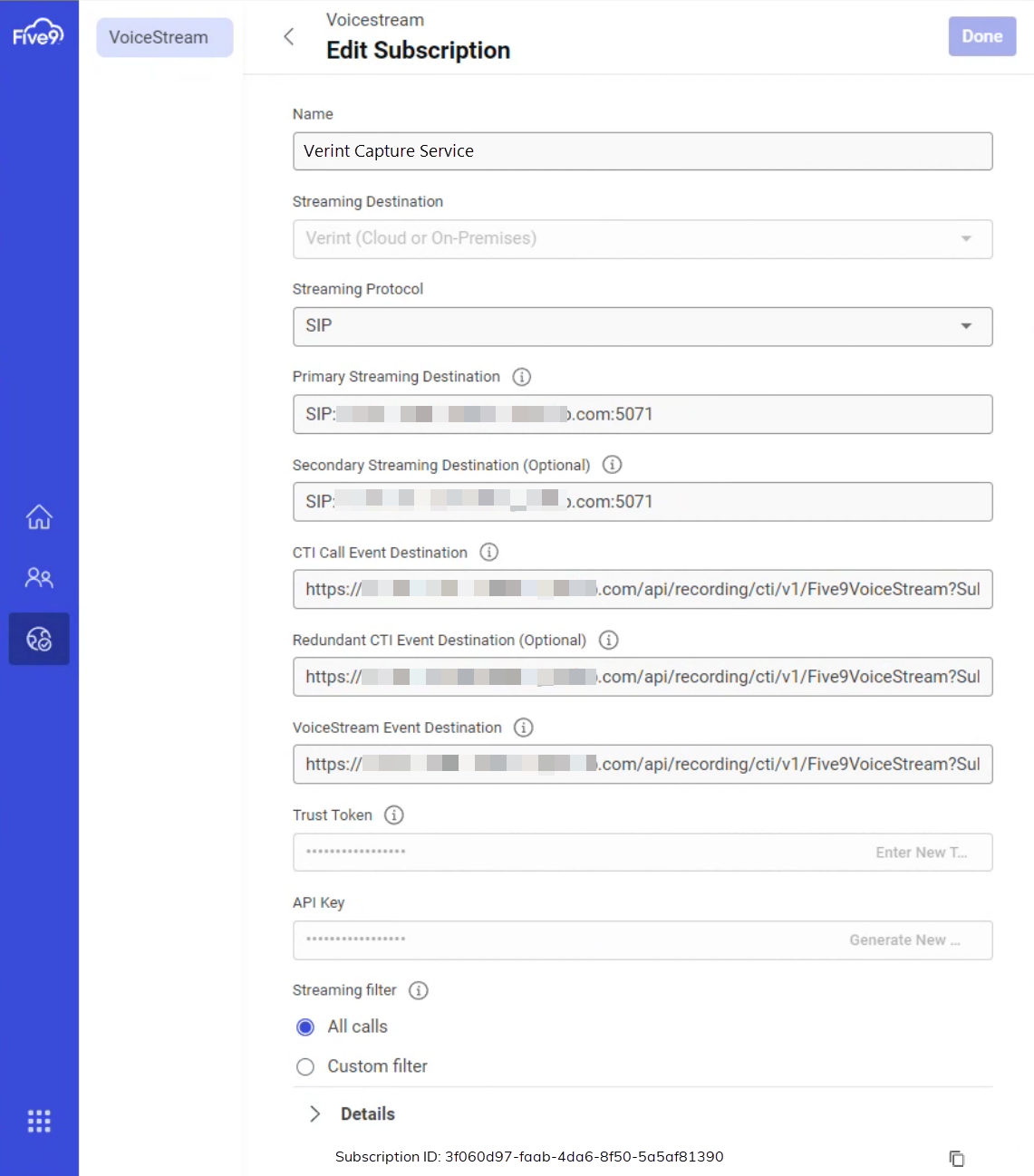
Enter the following values for the subscription that you got from your Verint Service Provider:
-
Primary Streaming Destination: Enter the domain name of the primary RIS server and the port number that is configured on the Verint SIP Proxy Adapter.
SIP: <RIS_Server01_FQDN>:<Port_SipProxyAdapter>.
-
Secondary Streaming Destination: If deployed, enter the domain name of secondary RIS server and the port configured on the SIP Proxy Adapter.
SIP: <RIS_Server02_FQDN>:<Port_SipProxyAdapter>.
-
CTI Call Event Destination: The primary CTI endpoint. Enter the API request that contains the domain of the primary RIS server and the dummy value for the subscription ID that is configured on the data source.
https://<RIS_Server01_FQDN>/api/recording/cti/v1/Five9VoiceStream?SubscriptionId=<Dummy_SubscriptionID_on_DataSource> -
Redundant CTI Call Event Destination: The secondary CTI endpoint that is used for redundancy. This API request points to the domain of the secondary RIS.
https://<RIS_Server02_FQDN>/api/recording/cti/v1/Five9VoiceStream?SubscriptionId=<Dummy_SubscriptionID_on_DataSource> -
VoiceStream Event Destination: The SIP endpoint. Enter the same API request that you entered for the primary CTI endpoint.
https://<RIS_Server01_FQDN>/api/recording/cti/v1/Five9VoiceStream?SubscriptionId=<Dummy_SubscriptionID_on_DataSource> -
Trust Token. The trust token configured on the data source.
-
-
Click Create.
The admin portal validates that the CTI endpoint is valid, creates the subscription, and provides a new Subscription ID and API Key.
-
Give the values for the Subscription ID and API Key to your Service Provider, so that they can update these values on the Verint data source.
-
Change all API request URLs to use the new subscription ID.
The admin portal validates that the CTI endpoint is valid and then saves the updated subscription information.
Example: