Create an AudioHook integration in the Genesys portal
Genesys requires that you create one AudioHook integration from the Genesys portal. This integration streams audio to the Verint Genesys Cloud CX AudioHook Media Adapter.
Procedure
-
Log in to the Genesys portal.
-
Go to the Admin home page, then the Integrations page.
-
Click + Integrations.
-
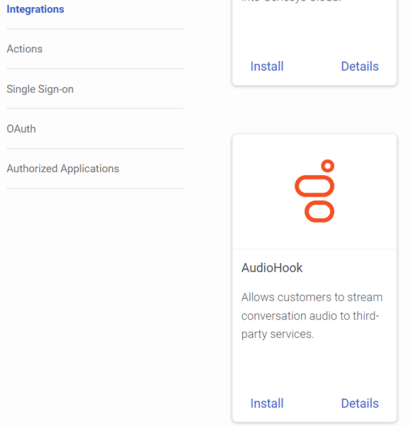
In the AudioHook panel, click Install.
-
On the Configuration - Properties screen, enter the Connection URI. This URI connects to the AudioHook Media Adapter using a WebSocket.
Only a secure WebSocket connection is allowed. Also, only port 443 is supported in the Connection URI.
-
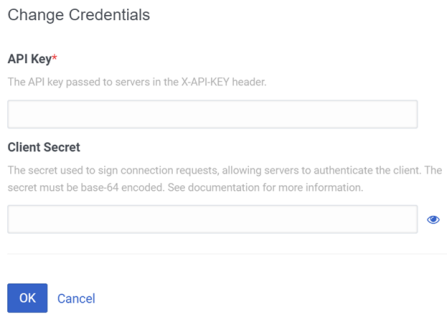
Click Credentials.
-
Enter the API Key in the API Key field.
The API Key can be any string that conforms to the ECMA 262 regex (for example, SGVsbG8sIEkgYW0gdGhlIEFQSSBrZXkh).
You need this same API Key when you configure the Genesys Cloud CX data source in a subsequent procedure.
-
Click OK.
-
Click Save. A new AudioHook integration displays. A successful AudioHook integration looks like this:
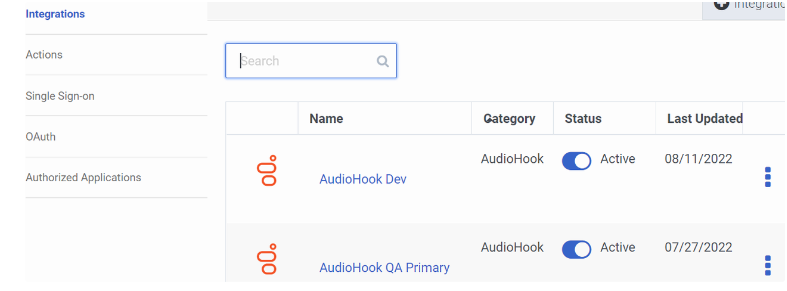
If the screen does not appear as shown here, check the screen for error messages. Also, look in the Recorder Integration Service logs for error messages. If you cannot resolve the error, contact Genesys for further investigation.
What to do next
Create a data source for Genesys Cloud CX
Workflow: Deliver Genesys Cloud events using Genesys Cloud CX API (method 1)