Integration overview for Google CCAI
To help you plan and prepare for your recording solution for Google Contact Center AI (CCAI), which is powered by Ujet, understand which components are required, how the components communicate, and who is responsible for deploying them.
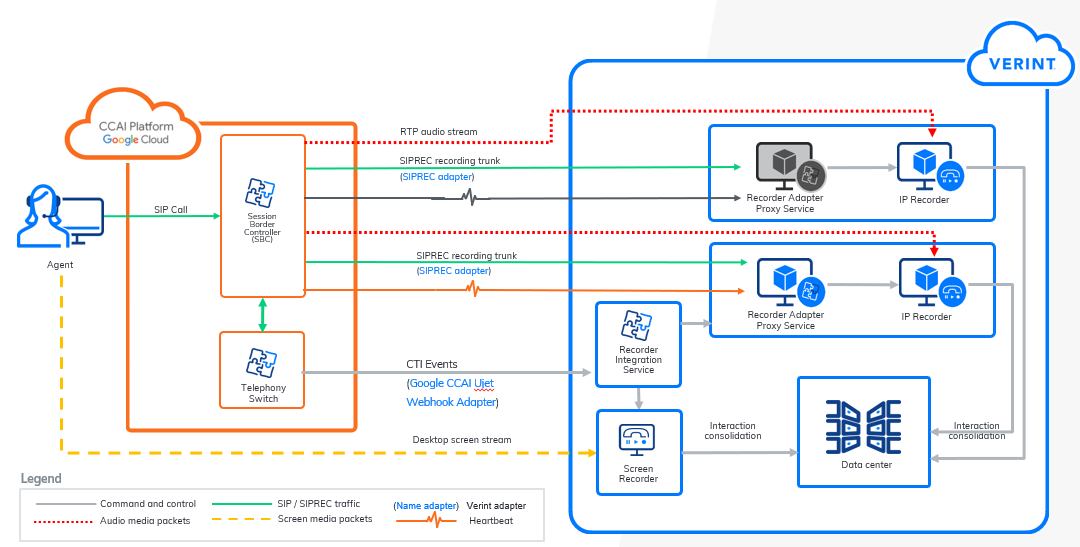
Components
-
Agent phone and computer running Verint Agent Desktop and the Verint Screen Capture module
-
Google CCAI Platform
The customer is responsible for configuring Google CCAI Platform.
-
Recorder Adapter Proxy Service (RAPS).
-
RAPS and IP Recorder roles. RAPS hosts Google Ujet Webhook Adapter.
-
Recorder Integration Service, which hosts Google Ujet Webhook Adapter
-
Screen Recorder
-
Data Center Service
Sequence for audio capture (call flow)
The following sequence of events demonstrates how the recording solution captures audio from an engagement:
-
A customer calls the agent or the agent calls the customer.
-
Google Ujet Webhook Adapter receives the CTI events CallState (status: waiting) and MediaState.
-
Google Ujet Webhook Adapter sends CTI Event to Google Ujet Tracker.
-
Google Ujet Tracker creates a call.
-
The agent answers the call.
-
Google Ujet Webhook Adapter (on RIS) receives the CTI Events CallState (status: accepted) and MediaState.
-
Google Ujet Webhook Adapter sends the CTI Events CallState (status: accepted) and MediaState to Google Ujet Tracker.
-
Google Ujet Tracker adds a connection and the current call status such as, Alerting, Ringing, Active, or Hold to the call.
-
Generic SIPREC adapter receives SIP INVITE: Create SIPCall and send STARTSTREAM to the IP Recorder.
-
The IP Recorder starts recording, creates an INUM, and sends the started message back to the RIS.
-
RIS receives the STARTED message and matches INUM to the correct session and contact by using the X-Twilio-CallSid correlation.
-
The call ends when the customer or agent hangs up the phone.
-
The call is consolidated in the database and can be searched and played back on the Verint WFO playback UI.
Sequence for screen capture
The following sequence of events demonstrates how the recording solution captures the configured agent's screen activity:
-
When the Recorder Integration Service receives a call Ringing event from the external system, the Verint Recorder sends a command to the Verint Agent Desktop service to start capturing the screen.
-
The Agent desktop service streams the screen to the Screen capture service, which hosts the LAN data source.
-
The Recorder Integration Service responds to events from the external system as follows:
Agent event
Service response
Ringing
Start capturing: Create a SCN file in the call buffer on the Recorder.
Not Responding
Stop capturing: Delete the SCN file.
Connected
Continue capturing. Mark the SCN file to be kept.
Conferencing, Consulting, Consult Done, On Hold, Hold Done, and Wrap Up
Continue capturing.
Agent Available
Stop capturing. Notify Ingestion Web Service.
-
Your personnel can replay the call audio and associated screen activity using Verint Interactions and Risk Management.