Multimedia Ingestion API Overview
The Multimedia Ingestion API enables ingestion of interactions into the system. These interactions can be created with audio, screen, or video content in the system. The content must comply with supported codecs and formats. After ingestion, standard Verint data at-rest encryption can be used to encrypt the content.
The Multimedia Ingestion API includes two API calls to upload an interaction:
-
Metadata upload: A POST request that contains the metadata for the interaction.
-
Content upload: For each content file to be added to the interaction, a separate POST is performed based on the URL returned from the Metadata upload request.
Example: Sequence for uploading audio and video
The following diagram shows the basic sequence for uploading an interaction with audio (wav file) and video (mp4 file).
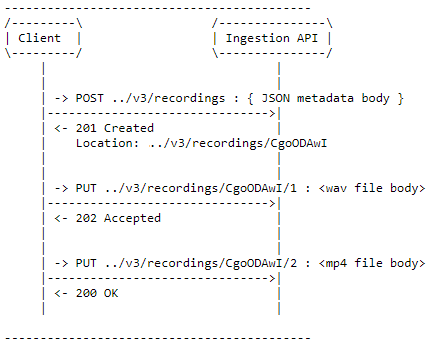
For metadata upload:
POST <myWFE>/api/recording/ingestion/v3/recordings/
{ ... metadata describing session with audio (part 1) and video (part 2) files ... }
201 Created
Location: <myWFE>/api/recording/ingestion/v3/recordings/Aw8KDgcFBAoHDwQOBA8NAA
{ ... response containing ID of interaction ... }
For content upload: First file, audio, a wave file (part 1)
PUT <myWFE>/api/recording/ingestion/v3/recordings/Aw8KDgcFBAoHDwQOBA8NAA/1
{ ... body contains contents of wav file ... }
What's new Multimedia Ingestion API v3 change history
Set up for Ingestion Recording (Recorder Configuration and Administration Guide)