Set account privileges for the domain account in Windows
You must assign a local security policy in Windows for the domain account. The log on as a service right allows the account to register a process as a service.
Procedure
- Log on to the server containing the RSA KMS database.
- Go to Control Panel > System and Security > Administrative Tools > Local Security Policy.
- In the Security Settings pane, expand Local Policies.
- In the Security Settings pane, click User Rights Assignment.
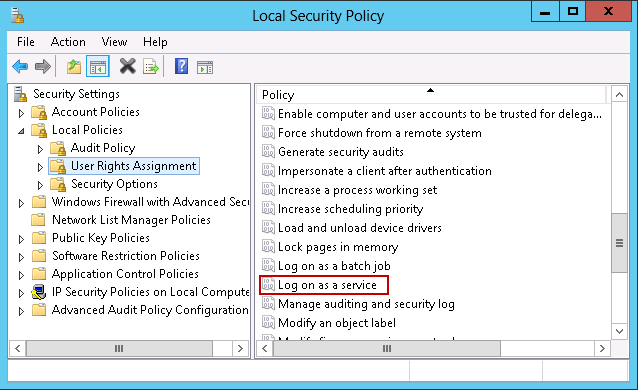
- In the right pane, under Policy, double-click Log on as a service.
- Add the domain service account.
- Click OK.
- Close the Local Security Policy window.