My Performance: KPI Component in Performance Overview
A KPI Component displays for each selected KPI in the Performance Overview workspace on the Performance page. The data displayed in the KPI Component represents a single KPI for a periodicity and the last 4 periods from the period selected. Click the KPI Component to drill down to the KPI View.
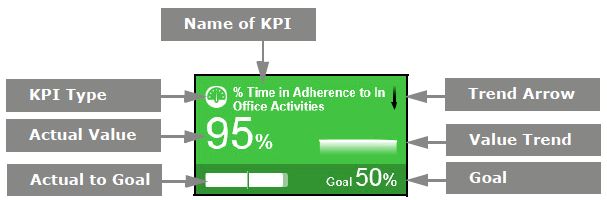
Each KPI Component displays the type and name of the KPI, trend arrow, value trend, goal, actual to goal, and actual value. The color of the KPI Component indicates the score. When the system requires a recalculation of the goal, an exclamation mark appears. When there is no data or the user does not have privilege to view the score, the KPI component appears gray.
 Person
 Person Roll-up to Organization
 Organization
  Supervisor Roll-up
  EDM
EDM