Session persistence (stickiness)
The LB must be configured with session persistence to enable a session connection with the same application server instance. Configure session persistence in all levels of load balancing (for example, if there is a global load balancer in front of a few local load balancers).
To achieve session persistence, configure the LB with one of the following persistence profiles:
-
HTTP Cookie
-
Client IP (Source address)
Consider the following:
-
If HTTP (layer 7) routing profile is configured, the preferred session persistence method is HTTP Cookie. HTTP Cookie allows better distribution between Application servers, due to non-browser clients that do not require persistence and do not use cookies. If TCP (layer 4) routing profile is configured, session persistence must be based on the client IP address.
-
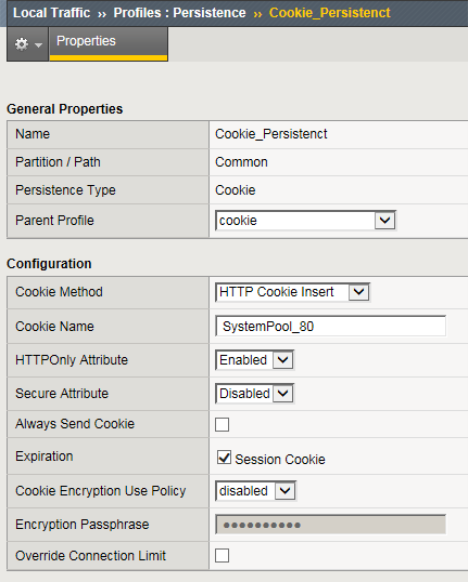
If the HTTP Cookie persistence type is selected, ensure that you determine a unique cookie name for each pool (in case more than one is configured, for example if there is more than one system configured in the LB).
-
Session persistence timeout: The session persistence time should be aligned with the session timeout defined in the system. By default this is 60 minutes.
Example: HTTP Cookie persistence type
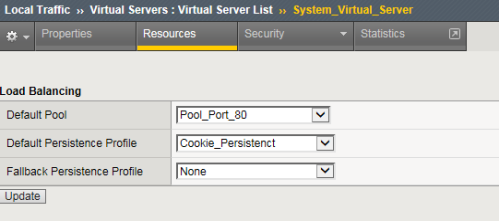
This example shows the configuration of an HTTP Cookie persistence type using the F5 BIG-IP LTM.
-
The virtual server is associated with a Default Pool and a Default Persistence Profile.
-
The persistence method is set to HTTP Cookie Insert.