SQL Server AlwaysOn solution
The AlwaysOn Availability Groups feature is a high-availability and disaster-recovery solution (DR) that provides an enterprise-level alternative to database mirroring.
This solution is only supported on SQL Servers Enterprise edition as WFO includes few databases and requires read access on secondary replica. Basic AlwaysOn is not supported as it supports only a single database, and does not have read access to the secondary replica.
Introduced in SQL Server 2012, AlwaysOn Availability Groups feature maximizes the availability of a set of user databases for an enterprise. An availability group supports a failover environment for a discrete set of user databases, known as availability databases, that fail over together (see https://msdn.microsoft.com/en-us/library/hh510230(v=sql.110).aspx).
WFO requires that all its databases within an instance are in the same availability group.
The AlwaysOn feature can be used in the following implementations:
-
Databases high availability (also known as standby databases)
-
Disaster Recovery (DR) solution for WFO databases
-
Off-load reporting
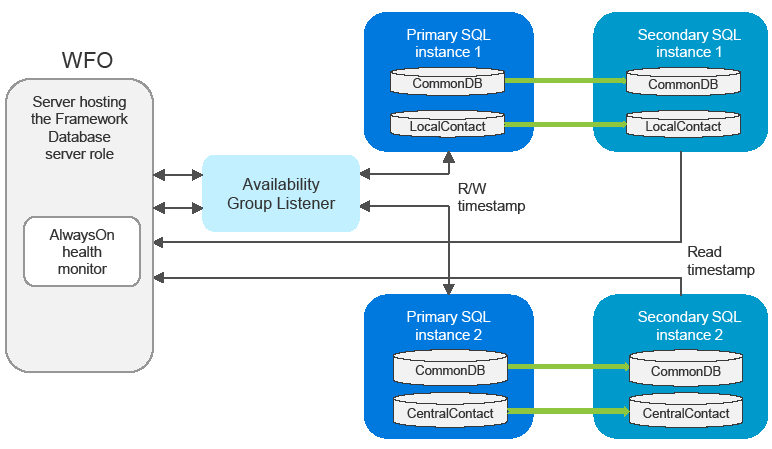
In databases high availability or DR implementations, the AlwaysOn feature synchronizes the secondary SQL instance with the primary SQL instance. In addition, to monitor the readiness of the primary and secondary SQL instances, an AlwaysOn health monitor is provided.
In off-load reporting implementation, the AlwaysOn feature synchronizes the secondary SQL instance with the primary SQL instance. The third-party reporting tool is connected to the secondary SQL instance only. Therefore, the primary SQL instance is not affected by the reporting tool.
WFO AlwaysOn Health Monitor
WFO communicates with the listener that manages the connection to the primary and secondary SQL instances, and provides the failover functions.
WFO can use the following AlwaysOn features:
-
Asynchronous-commit mode and synchronous-commit mode.
-
Automatic failover and manual failover.
The monitor is installed on the server hosting the Framework Database server role.
The monitor consists on a time stamp written to each database on the primary SQL instances. The time stamp is replicated as part of the database replication to the secondary SQL instance.
To validate that the databases are synchronized, the AlwaysOn monitor runs in five minutes intervals, and compares the time stamps between the primary and secondary instances. If there is an issue related to database failover readiness, the monitor provides a relevant alarm message on the WFO system monitor.