Campaign processing input flow
The campaign processing input flow describes how campaigns when used by the Real-Time Analytics (RTA) Framework:
-
Collect the interaction information
-
Generate and process update packets
-
Store the interactions in the Contact Database
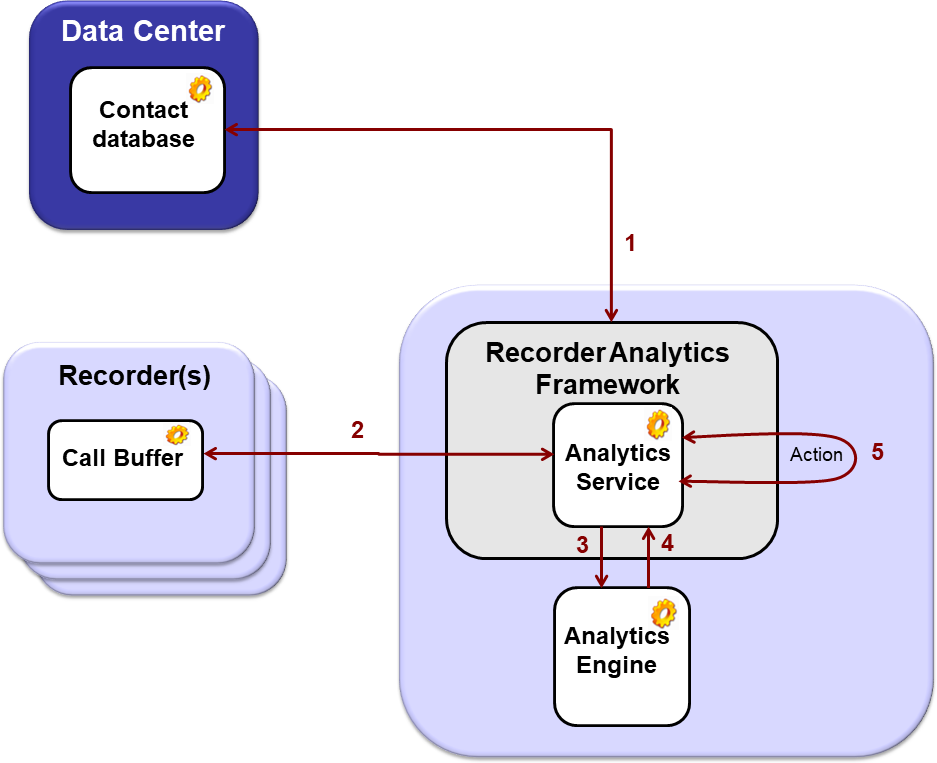
The flow shows how interactions are processed at a scheduled time using Recorder Analytics Rule through the Recorder Analytics Framework. The flow then describes the point of a resulting action, such as an alert or a tagging update.
|
Seq.# |
Source |
Destination |
Description
|
|---|---|---|---|
|
1 |
Recorder Analytics Framework |
Contact Database |
Recorder Analytics Framework runs a campaign query on the Contact Database, which returns jobs. |
|
2 |
Analytics Service |
Call Buffer |
Analytics Service looks in the Call Buffer on the local recorder for metadata and audio streams.
|
|
3 |
Analytics Service |
Analytics Engine |
Analytics Service reads the campaign to determine which Recorder Analytics Rules to process. Analytics Service sends metadata and audio streams for the interaction to each Analytics Engine involved. |
|
4 |
Analytics Engine |
Analytics Service |
Analytics Engines process the rules and send the results back to the Analytics Service. |
|
5 |
Analytics Service |
Appropriate location, depending on the action to take |
Analytics Service triggers the appropriate actions as requested. Example: Tag Action; Alerts Action. |