Call recovery overview for Twilio Flex
The call recovery process helps minimize data loss caused by issues on the network. The process finds missing interactions and recovers them from Twilio Flex. Understand Twilio Flex and Verint components required for call recovery and how these components interact.
System Requirement
To enable the recovery functionality for Twilio Flex, contact us to get the related KB.
Components
Call recovery finds missing interactions by comparing data in the Verint Contact Database with contact records in Twilio Flex. The missing audio interactions are then downloaded from Twilio Flex to Verint.
The following technical diagram shows the components required for call recovery and describes the flow of data between components. 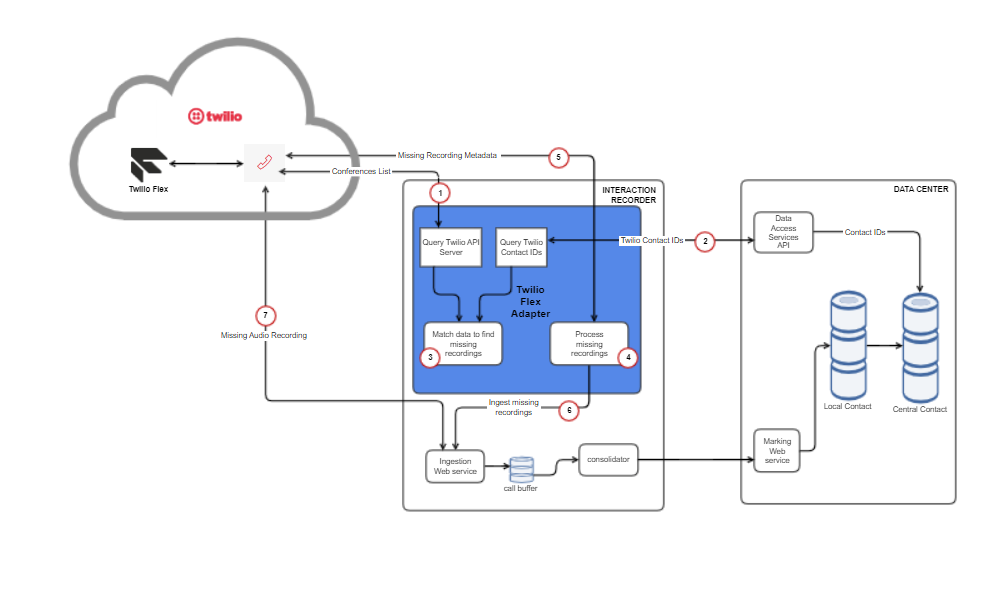
-
Using Twilio API endpoints api.twilio.com and insights.twilio.com queries Twilio Flex for the Conference records of calls that occurred during a specified period. For manual recovery, you specify the period, wherein, for automatic recovery, the period is specified by the system.
-
Using the Verint Data Access Services (DAS) API, queries the Central Contact Database for all completed contacts for the specified period.
-
Matches the entries received from Twilio API server with the results returned by the DAS API and identifies missing calls.
-
Processes missed recordings.
-
Using Twilio API, queries Conference Recording metadata of the missing calls during processing of missed recordings.
-
The Interaction Capture service ingests missing calls and stores them in the call buffer (cache). During ingestion, it downloads the missing audio recordings also as mentioned in Step 7.
-
Downloads the missing audio files from Twilio API server.
What to do next