Integration overview for real-time audio capture from Twilio Flex
Plan and prepare for integrating the Verint recording solution with Twilio Flex by understanding the required components, how they communicate, and who is responsible for deploying them.
Diagram: Components for real-time audio and agent screen capture
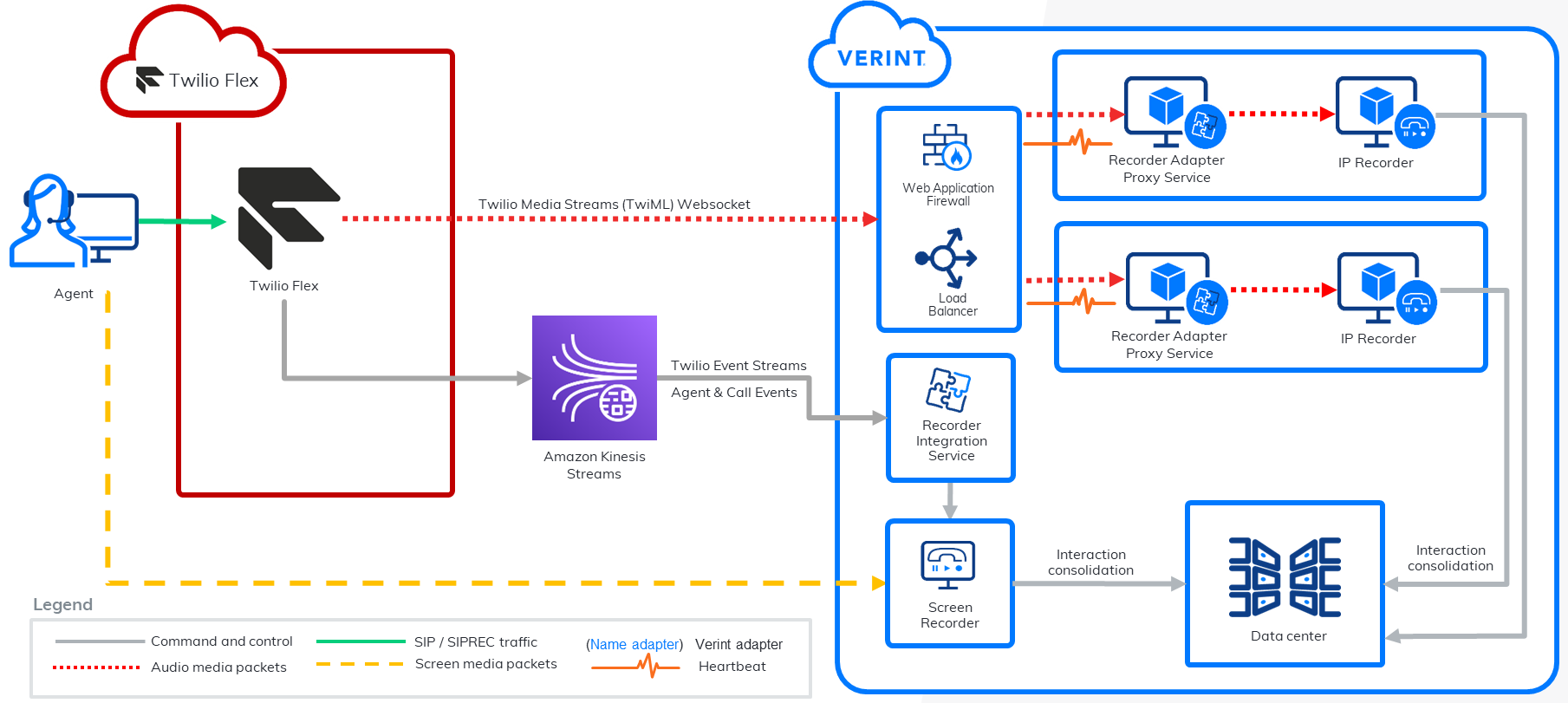
Components for real-time audio capture
-
Agent
-
Twilio Flex contact center
-
Amazon Kinesis streams
Amazon Web Service (AWS) is used to stream CTI events.
-
Web application
-
Load balancer
Deploy a load balancer to manage traffic and to improve the availability and scalability of your recording solution. A load balancer forwards the audio streaming requests from Twilio Flex to the Verint Recorder Adapter Proxy Service servers.
-
Recorder Adapter Proxy Service, which hosts the Twilio Media Adapter
The Twilio Media adapter invokes the Media Streams API to start audio streaming, listening to WebSocket connections, and redirecting the audio packets.
-
IP Recorder
-
Recorder Integration Service, which hosts the Twilio Event Stream Adapter
-
Verint Data Center
The customer is responsible for configuring the Twilio Flex contact center.
Communications for real-time audio capture
-
Call between a customer and an Agent over the Twilio Flex contact center.
-
WebSockets carry text messages, which contain call metadata and the audio files. The messages are in JSON and encrypted in Byte 64 format.
-
Agent events and call events (real-time)
-
Interaction consolidation
Verint retrieves interactions from the contact center using the Twilio API, which is a set of RESTful APIs.
Call flow for real-time audio capture (A, B, C, D, and E)
Verint starts and stops capturing the audio from a customer engagement based on the events it receives from the external system. The recording solution captures the calls that monitored agent makes and takes. When the last monitored agent leaves the call, recording stops.
A typical call flow can go like this:
-
A customer calls an agent.
-
The Verint Twilio Event Stream adapter (on the Recorder Integration Service) receives the CTI event “Reservation.Created“.
-
The Twilio Event Stream adapter sends the CTI event “Reservation.Created“ to Twilio Event Stream tracker.
-
The Twilio Event Stream tracker creates a call.
-
The Agent answers the phone.
-
The Twilio Event Stream adapter receives the CTI event “Reservation.Accepted“.
-
The Twilio Event Stream adapter sends CTI event “Reservation.Accepted“ to the Twilio Event Stream tracker (on the RIS).
-
The Twilio Event Stream tracker adds a connection and the current call status (Alerting, Ringing, Active, or Hold) to the call.
-
The Stream Manager sends a StartDuplicateStream message to the Twilio Event Stream adapter.
If the StartDuplicateStream message does not include the Stream ID (SID) for the call, the Twilio Event Stream adapter calls the Twilio Conference API to get the call SID. The SID is required to start the stream.
-
The Twilio Event Stream adapter sends a request to the Twilio Start Stream API to start streaming audio from one call SID.
-
The Twilio Start Stream API connects to the WebSocket Target URL, which goes through the load balancer.
The load balancer directs the request to one of Recorder Adapter Proxy Service (RAPS) server in the pool.
-
The Twilio Media adapter (on the RAPS) creates a WebSocket connection. It receives audio and sends the audio to the IP Recorder through Recorder Media Interface (RMI) client (on the RAPS).
-
The IP Recorder starts recording, creates an INUM, and sends a STARTED message to the Recorder Integration Service.
-
The Recorder Integration Service receives the STARTED message and matches the INUM to the correct session and contact by using the agent’s extension.
The Extension is the user name that the agent uses to sign in to their Twilio Flex account. This user name is the agent's email address.
-
The call ends when the Customer or agent hangs up the phone.
-
The Stream Manager sends a StopDuplicateStream message to the Twilio Event Stream adapter.
-
The Twilio Event Stream adapter sends a request to Twilio Stop stream API to stop streaming audio from the call SID.
-
The WebSocket connection is closed.
-
Twilio Media adapter sends a stop message to IP Recorder.
-
The call is consolidated in database.
You can now search for and play back the call in Verint Risk Management and Interactions modules.
Integration overview for post-call audio capture from Twilio Flex