Adherence Exceptions
Default Access Rights
This report can be run by the following roles: Manager, Retail Regional Manager, Tenant Administrator.
Overview
This report consists of a list of exceptions for each employee for the selected employee filter and time period.
There can be more than one record returned for a single exception. An exception is defined per planned activity; a new exception is not counted as beginning until the planned activity has changed. Also, it is necessary to return a new record whenever any information changes, such as the actual activity or approval status.
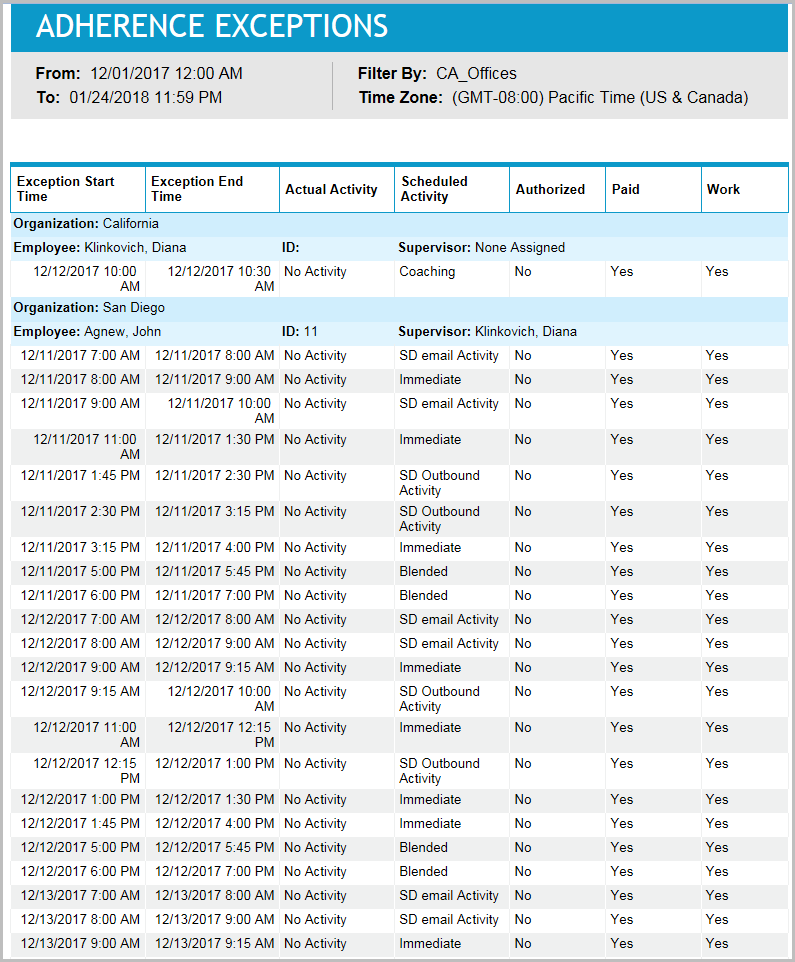
Managers can use this report to investigate the details of employee non-adherence to schedule. Managers can look for employees with unusual numbers of exceptions, or for patterns of exceptions related to particular times or activities. The information in the Approved By column is helpful for determining who authorized a particular instance of non-adherence, and also for discovering whether any approvers have an unusual number or pattern of such authorizations. If employees are held to adherence goals, it is particularly useful to review authorization patterns to verify that some managers are not authorizing more exceptions than others, thus making it easier for their employees to achieve the goals.
Inputs
-
Employee Filter: Indicates the set of employees to report on.
-
Time Frame: Defines the date and time range of the report. Select one of the following options:
-
Last <x> days: Defines the number of days (24-hour periods) before the current date and time, which serves as the start date and time for the report data. The end date and time for report data is the current date and time. For example, you enter 4, making the parameter Last 4 days. Today's date is 8/30/2023 and the current time is 3:00 PM. Therefore, the report displays data from 8/26/2023 at 3:00 PM until 8/30/2023 at 3:00 PM.
-
Date range: Defined date and time range from which the report data is calculated. For example, you select 8/27/2023 at 2:00 PM - 8/31/2023 at 9:00 AM. Therefore, the report displays data from 8/27/2023 at 2:00 PM - 8/31/2023 at 9:00 AM.
-
-
Time Zone: Defines the time zone used for the date and time calculations for all date and time fields for the report (including the Date range and Last <x> days input parameters, and the From / To date and time headers on the report).
Outputs
-
From / To: Displays the date and time range of the data included in the report.
-
Organization: Name of employee's organization.
-
Employee Name: The name of the employee to whom the exception belongs.
-
Employee ID: The ID of the employee to whom the exception belongs.
-
Manager Name: The name of the employee’s manager.
-
Exception Start Time: The date and time of day that the exception begins.
-
Exception End Time: The date and time of day that the exception ends.
-
Actual Activity: The activity the employee has logged into.
-
Scheduled Activity: The activity the employee is supposed to be logged into.
-
Authorized: If the exception is approved, and the name of the person who approved it is known, the Authorized column contains the string Approved By: followed by the approver’s name. If the exception is approved but the approver’s name is not known, the Authorized column contains the string Yes. If the exception is not approved, the Authorized column contains the string No.
-
Paid: Indicates whether the scheduled activity is paid. A scheduled activity is paid if its underlying event is paid. In most cases, this is the default attribute of the event's activity. For shift activity assignments, the Paid property taken from the shift activity assignment's parent shift activity. For a time-off event, it is paid if there is a paid shift assignment or shift activity assignment underneath.
-
Work: Indicates whether the scheduled activity is considered work. The Work property is computed as follows: Shift assignments and calendar event assignments are always considered work. Shift activity assignments are considered work if their activity's Shift column is checked in the Activities module (Organization mode) in Forecasting and Scheduling. Time-off events are never considered work.