Adherence Numbers by Interval
Default Access Rights
This report can be run by the following roles: Manager, Retail Regional Manager, Tenant Administrator.
Overview
This report provides detailed staffing and adherence information for each 30-minute interval throughout the day. (No rows are returned for intervals with no data.)
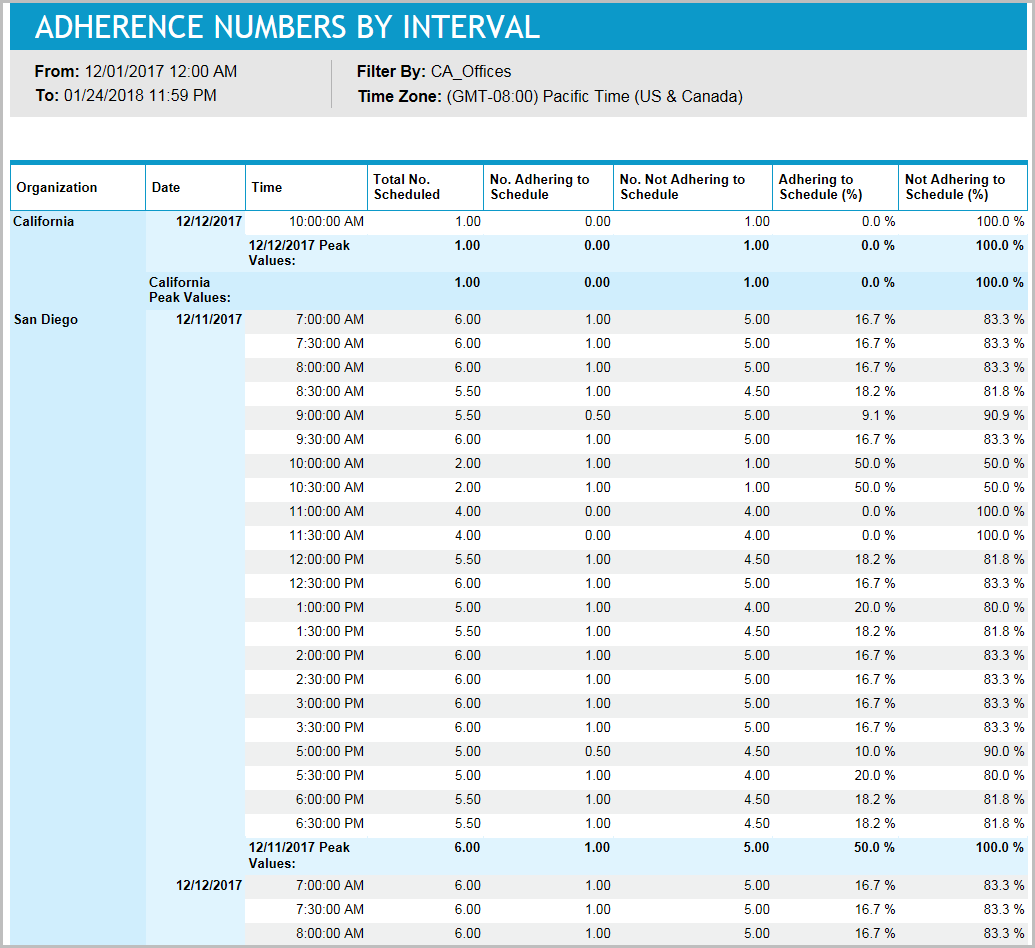
This report is helpful for investigating the root causes of service level problems. For example, if scheduled staffing was adequate during an interval with low service level results, but adherence to schedule was poor, then the poor adherence might be partially or entirely responsible for the bad service results.
Inputs
-
Employee Filter: Indicates the set of employees to report on.
-
Time Frame: Defines the date and time range of the report. Select one of the following options:
-
Last <x> days: Defines the number of days (24-hour periods) before the current date and time, which serves as the start date and time for the report data. The end date and time for report data is the current date and time. For example, you enter 4, making the parameter Last 4 days. Today's date is 8/30/2023 and the current time is 3:00 PM. Therefore, the report displays data from 8/26/2023 at 3:00 PM until 8/30/2023 at 3:00 PM.
-
Date range: Defined date and time range from which the report data is calculated. For example, you select 8/27/2023 at 2:00 PM - 8/31/2023 at 9:00 AM. Therefore, the report displays data from 8/27/2023 at 2:00 PM - 8/31/2023 at 9:00 AM.
-
-
Time Zone: Defines the time zone used for the date and time calculations for all date and time fields for the report (including the Date range and Last <x> days input parameters, and the From / To date and time headers on the report).
Outputs
-
From / To: Defines the date and time range of the data included in the report.
-
Organization Name: The name of the organization that is being reported on.
-
Date: Date/time of the interval.
-
Total No. Scheduled: Total number of full agents that are scheduled during the interval. For example, if there are two agents whose schedules intersect the interval by only 15 minutes each, they would be combined to equal one agent.
-
No. Adhering To Schedule: The number of agents adhering to their scheduled activities during this interval.
-
No. Not Adhering To Schedule: The number of agents not adhering to their scheduled activities during this interval.
-
Adhering To Schedule (%): Percentage of employees adhering to their schedule. Adhering to Schedule (%) - (No. Adhering to Schedule / Total No. Scheduled) * 100
-
Not Adhering To Schedule (%): Percentage of employees not adhering to their schedule. Not Adhering to Schedule (%) - (No. Not Adhering to Schedule / Total No. Scheduled) * 100
This report uses the function BP_TF_INTERVALS.SQL