Assigned Schedules
This report lists all assigned schedules. It lists shifts for each agent that belongs to one of the organizations, and who is scheduled for the given scheduling period.
The shifts are detailed for each working day of the week (scheduled period), and for each shift there is a drill down of the activities for that shift. There is also a drill down for each agent with his skills and proficiencies.
Default Access Rights
This report can be run by the following roles: Manager, Scheduler.
Inputs
-
Organization: Which organization should be reported on.
-
Schedule Period: Which schedule period should be reported on.
-
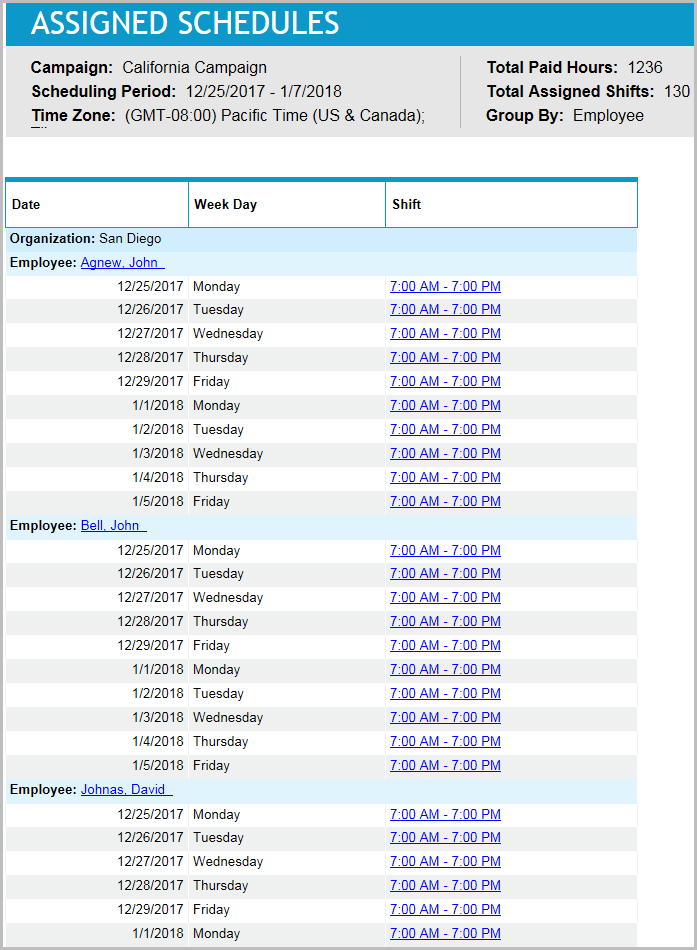
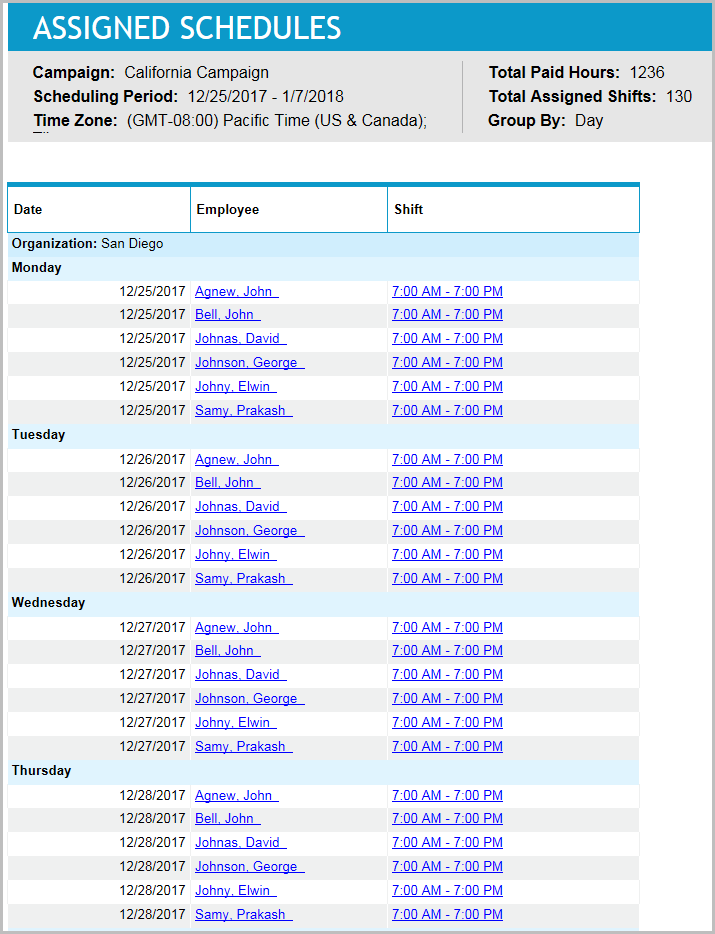
Group by: Which resolution should appear in the report for grouping. Select Employee or Day.
The following graphic shows the report with Group By set to Employee:
The following graphic shows the report with Group By set to Day:
Outputs
-
Campaign: <name>: The campaign by which the schedules are grouped.
-
Week <start_date end_date>: The week that is being reported on.
-
Organization Name: <name>: The name of the organization by which the schedules are grouped.
-
Organization Timezone: <timezone>: The timezone of the organization by which the schedules are grouped.
-
Total Paid Hours: The amount of paid (scheduled) hours for the organization.
-
Total Assigned Shifts: The amount of assigned shifts for the organization.
-
Employee Name/Week Day: The value listed here is Employee Name if the Group and Sort input parameter selected was Name or Week Day if the Group and Sort input parameter selected was Day.
-
Week Day/Employee Name: The value listed here is Week Day if the Group and Sort input parameter selected was Name or Employee Name if the Group and Sort input parameter selected was Day.
-
Employee name by which the shifts are grouped: This value appears as the header if the Group and Sort setting is Name. This header is a link to the Skill Schedules Report subreport (see detailed description below). If the Group and Sort setting is Day, the employee name does not appear as a header, but is still a link to the Skill Schedules Report subreport.
-
Weekday by which the shifts are grouped: This value appears if the Group and Sort setting is Day.
-
Shift: Details about the shift scheduled. The value of the column is a range of hours of the shift. For example, 8:15:00 AM - 4:15:00 PM, and is also a link to the Shift Schedules Report subreport (see detailed description below).
As mentioned previously, this report has two subreports:
-
Skill Schedules Report: Lists the skills of an agent, and the proficiency level for each skill.
Outputs
-
Employee Name: <name>: The agent that is reported on.
-
SkillName: The name of the skill.
-
Proficiency: The proficiency level for the skill.
-
Shift Schedules Report: Displays start and end times for each activity in a shift.
Outputs
-
Shift: Range of hours for the shift. It has the same format that appeared in the link that led to the subreport.
-
Activities: The activities that occurred during the shift. It includes activity event start time, activity event end time, and the activity name.