Capacity Plan
The Capacity Plan report lets you view the workload for all work queues and unpublished calendar activities for all employees belonging to the selected organization(s). The report computes the gross required hours, net required hours, and required FTEs, based on actual or forecasted volumes for each work queue and activity for the duration of the report period.
Queue Types:
-
VCT Queues: The report uses the time standard defined for the queue.
-
Non-VCT Queues: The report uses volumes and AHT from the Queue Analytics section for the selected organization and computes the gross required hours and net required hours for the queue. AHT is a weighted average based on volumes.
The report output consists of four graphs, such as the following:
The graphs are then followed by three tables:
-
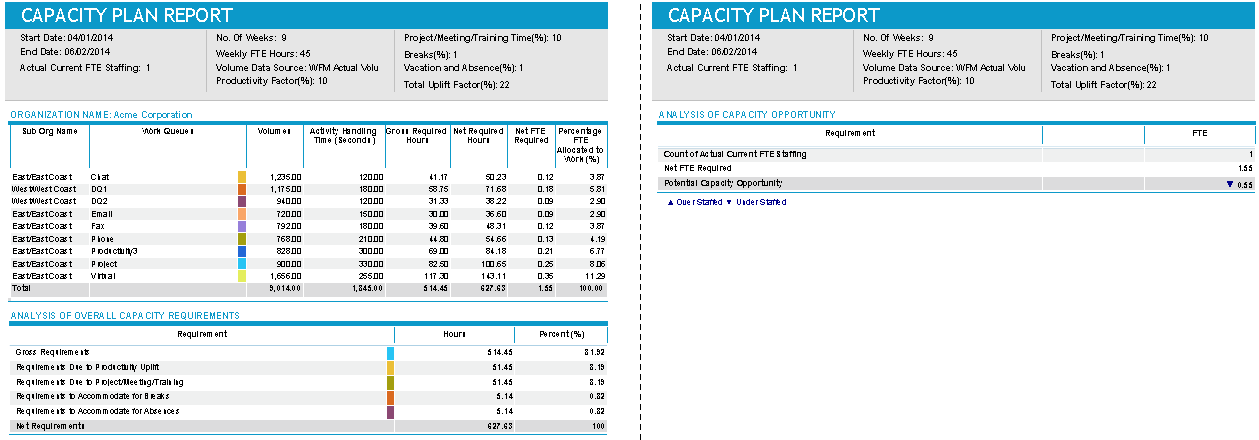
Work queue information
-
Analysis of Overall Capacity Requirements
-
Analysis of Capacity Opportunity
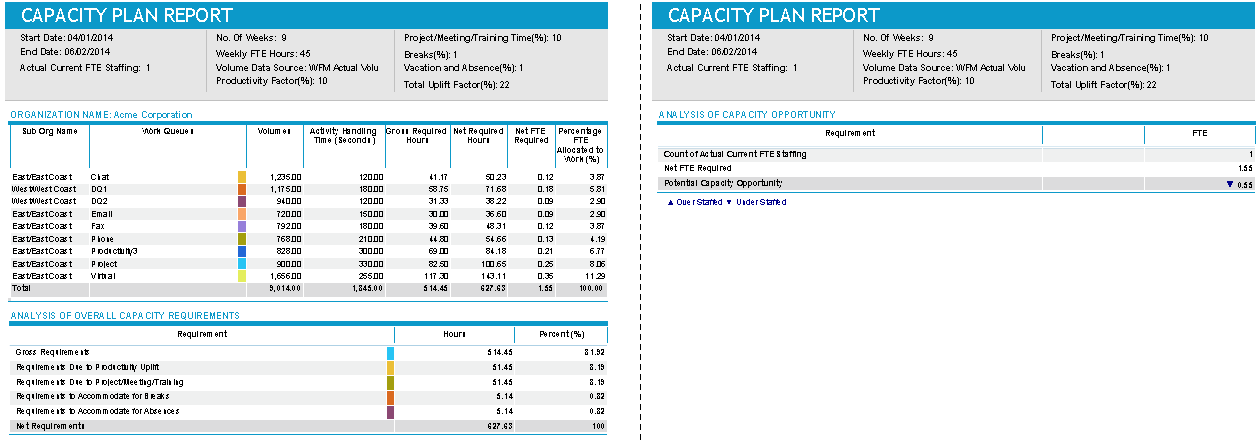
The following shows a sample of these tables using the data source WFM Actual Volumes.
Default Access Rights
This report can be run by the following roles: Administrator, Manager, Scheduler.
Inputs
-
Date Range: The beginning and ending dates of the report period.
-
Organizations: The organization(s) for which you want to run the report.
-
Volume Data Source: Select one of:
-
WFM Actual Volume = Historical actual volumes.
-
WFM Forecasted Volume = Forecasted volumes from Forecasting and Scheduling.
-
VCT Completions = VCT completions (with this setting, the report can be run without access to Forecasting and Scheduling).
-
-
Productivity Factor (%): The percentage reduction in capacity to account for general overhead activities.
-
Project/Meeting/Training time Factor (%): The percentage reduction in capacity to account for projects, meetings, and training time. You can either input this factor manually (using the top radio button) or extract this factor from the existing data (using the lower radio button).
-
Vacation and Absence Factor (%): The percentage reduction in capacity to account for vacations and absences.
-
Breaks Factor (%): The percentage reduction in capacity to account for break time.
-
Paid Weekly FTE Hours: The FTE basis for number of working hours defined at the weekly level that is used for calculating required FTEs.
-
Actual/Current FTE in Department: The total number of FTEs in the organizations (including their suborganizations) for which the report is to be run.
Outputs
As mentioned previously, the report output consists of three tables:
-
Work queue information
-
Analysis of Overall Capacity Requirements
-
Analysis of Capacity Opportunity
Work Queue Information
The information for all work queues of each parent organization together with its child sub-organizations are presented in the top table.
-
Sub Org Name: If one or more work queues belong to a suborganization, this column is populated with the names of work queues belonging to the suborganization. This indicates that the work queues are assigned to the suborganization and not to its parent organization.
-
Work Queues: The name of the work queue belonging to the parent organization listed at the top of the table or its child organization(s).
-
Volumes: Depends on the mode selected (WFM Actual Volume, WFM Forecasted Volume, VCT Completions).
-
WFM Actual Volume: The total actual volume within the report period for every work queue is displayed.
-
WFM Forecasted Volume: The total forecasted volume within the report period for every work queue is displayed.
-
VCT Completions: The total number of VCT completions within the report period for every work queue is displayed.
-
-
Activity Handling Time (Seconds): The activity handling time in seconds for each work queue configured on the Work Queue Configuration page.
-
Gross Required Hours: The volume for the work queue * Activity Handling Time for the work queue / 3600.
-
Net Required Hours: Gross Required Hours/ Efficiency
-
Net FTE Required: (Weekly FTE Hours * No of Weeks)
-
Percentage FTE Allocated to Work (%): FTE / Organization Total FTE * 100.
Analysis of Overall Capacity Requirements
-
Requirements: The gross requirements, reduced by the specified factors, to produce the net requirement.
-
Hours: The hours for each of the items in the Requirements column.
-
Percent (%): The percent of the Net Requirements for each of the items in the Requirements column.
Analysis of Capacity Opportunity
-
Requirement: List categories for actual vs. required FTE and Potential Capacity Opportunity (understaffed vs. overstaffed).
-
FTE: Shows actual vs. required FTE.