Daily Forecast Assessment
This report displays the forecasted and actual contact volumes and average handling times for the selected queue(s) for the given time period.
The display uses a daily granularity along with a calculation of the total for the entire period. The percentage deviation of the actual data from forecasted is also displayed in the report. Additionally, the report summary displays the highest and lowest values for the statistics within the time frame.
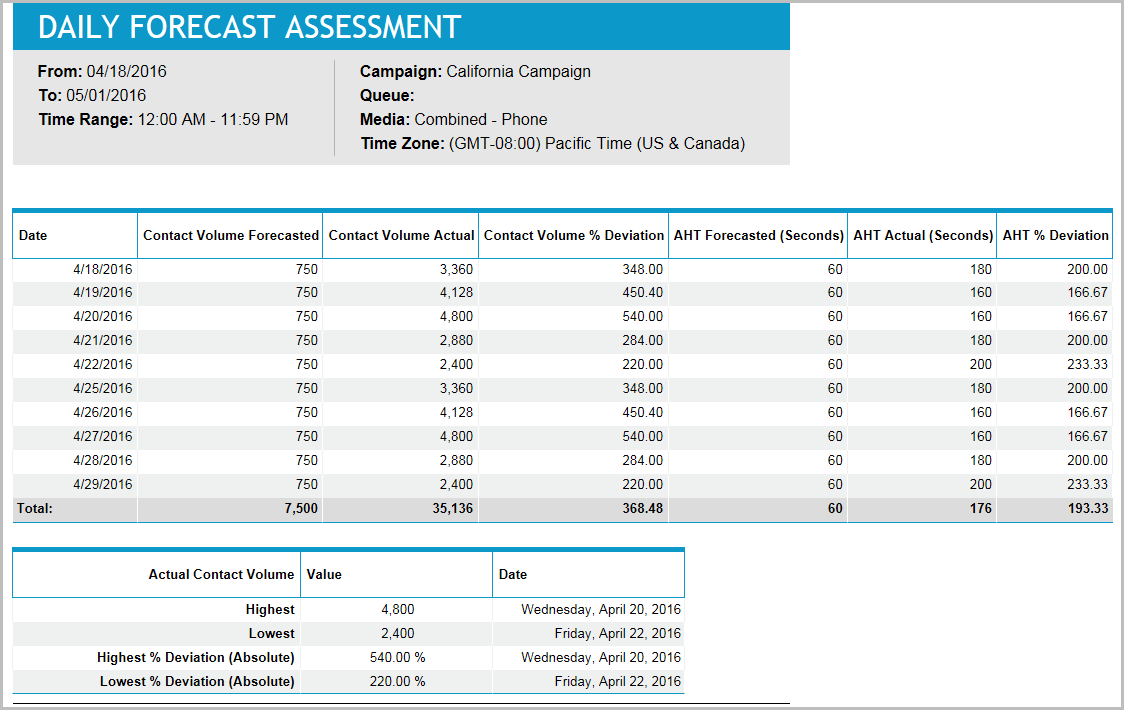
Forecasters can review this report to gauge how accurate their daily contact volume and AHT forecasts are for individual queues or the combined queue for a campaign. They can also see the highest and lowest contact volumes in the time period selected and the highest and lowest deviation. After identifying periods where deviation was high, forecasters should review what actually happened during that day so they can improve their forecasting technique for the future. Management can review this report to assess forecasters’ performance.
Default Access Rights
This report can be run by the following roles: Scheduler.
Inputs
-
Date Frame: Specifies the date period for which the report is generated. This can be set in one of two ways:
-
Last <n> days: The previous n days, not including the current day. A value of 0 has no effect.
-
Specify the start and end dates. Specifying the start date and end date as today's and tomorrow's date allows you to report on the current day's data.
-
-
From Time: Specifies the start time of the day. The From Time and To Time parameters specify the time range within each day of the specified date range for which the report is generated.
-
To Time: Specifies the end time of the day. The From Time and To Time parameters specify the time range within each day of the specified date range for which the report is generated.
-
Queue: Indicates the queue on which to report. Can be a single, multiple, or a combined queue.
-
Time Zone: Indicates the time zone used for display.
Outputs
-
Contact Volume Forecasted: The forecasted contact volume for that day.
-
Contact Volume Actual: The actual contact volume for that day.
-
Contact Volume % Deviation: The percentage deviation of the actual contact volume from the forecasted contact volume.
-
AHT Forecasted (Seconds): The forecasted average handling time.
-
AHT Actual (Seconds): The actual average handling time.
-
AHT % Deviation: The percentage deviation of the actual average handling time from the forecasted average handling time.
Summary Information
The summary information reports the value and day of the week and date for:
-
Contact Volume
-
Highest: The highest single hourly Contact Volume value in the entire report.
-
Lowest: The lowest single hourly Contact Volume value in the entire report.
-
Highest % Deviation (Absolute): The Contact Volume % Deviation hourly value with the greatest absolute value.
-
Lowest % Deviation (Absolute): The Contact Volume % Deviation hourly value with the least absolute value.
-