Daily Planned Time Assessment by Employee
This report does a daily aggregation of scheduled activity properties per employee, for each workday specified in the time frame.
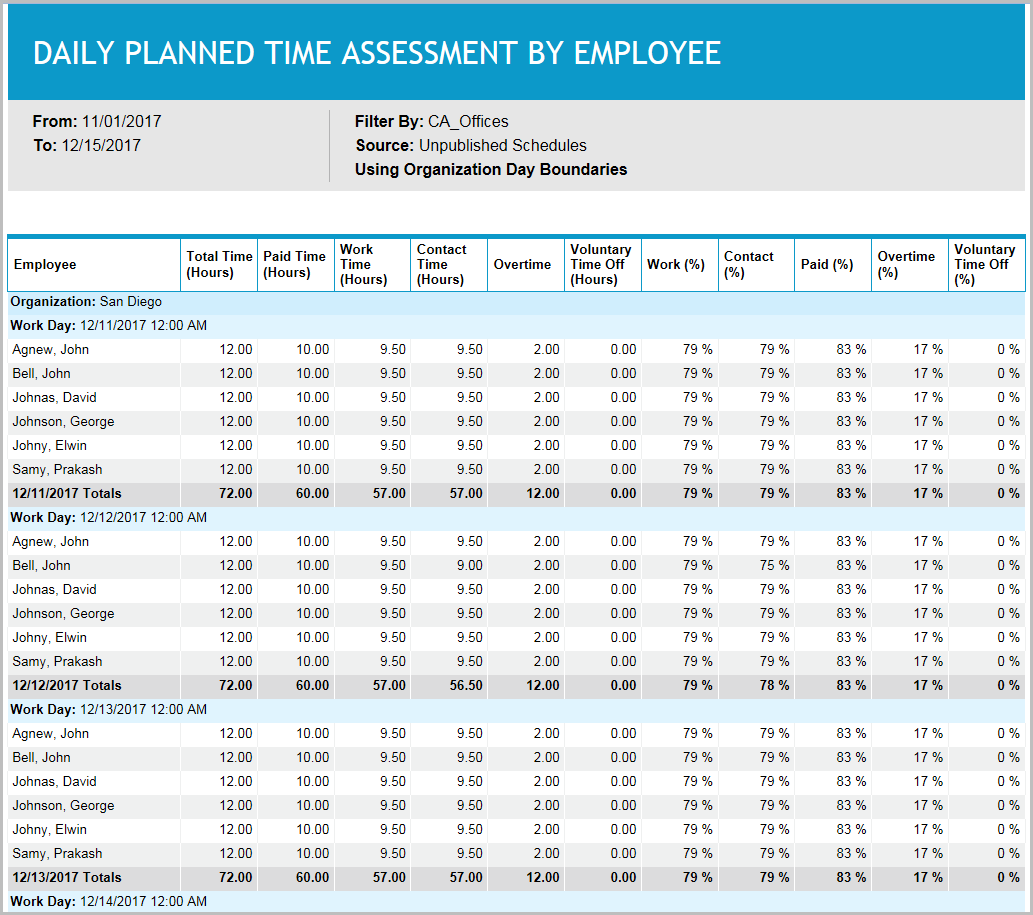
Schedulers can use this report to verify the amount of paid time and contact time for each employee. When used in conjunction with an appropriate filter, this report can be especially helpful in situations where the schedulers are required to provide a specific number of hours (for example, part-timers cannot exceed 30 paid hours) or distribute hours “fairly” across a particular group (for example, all technical support representatives should receive a similar number of hours handling customer contacts).
Default Access Rights
This report can be run by the following roles: Scheduler.
Inputs
-
Employee Filter: Indicates the set of employees to report on.
-
Schedule Period (reports that are in view time zone): These reports generally return a single aggregation for the specified time period or a set of records corresponding to all events that start in or intersect the time period.
-
Last <X> days (reports that are in view time zone): This mode returns <X> 24-hour periods starting from current time.
-
From/To date (reports that are in view time zone): Aggregates data for intersecting portion. Only the portion of the events that intersect the specified time window are included in the aggregate. For reports that return events, all events that start in the specified time window are returned.
-
Schedule Period: Applies an additional constraint, that employees must be in the selected week of the campaign or scheduling period.
-
Use Published Schedules: Indicates whether to use published or unpublished schedules.
-
Outputs
-
Organization: The employee's organization.
-
Workday: The day in the organization’s timezone.
-
Employee Name: The name of the employee being reported on.
-
Total Time: The total number of hours worked by the employee on that day.
-
Paid Time: The total paid hours for the workday.
-
Work Time: The total work hours for the workday.
-
Contact Time: Time is considered contact time if the scheduled activity is linked to a media.
-
Work (%): The percentage worked over the total scheduled time for the workday.
-
Contact (%): Contact time / Total time
-
Paid (%): Paid time / Total time
-
Overtime: The number of overtime hours, excluding overtime gaps.
-
Voluntary Time Off: The number of voluntary time off hours.
-
Overtime (%): (OT/Total Time) * 100.
-
Voluntary Time Off (%): (VTO/Total Time) * 100.