Detailed Time Record
Default Access Rights
This report can be run by the following roles: Manager
Overview
The report returns detailed time entry information per employee, per day. Time entries are included in the day where the time entry's time record starts; a time entry can begin on the next day but if its time record starts on current day, it is included in the day being reported.
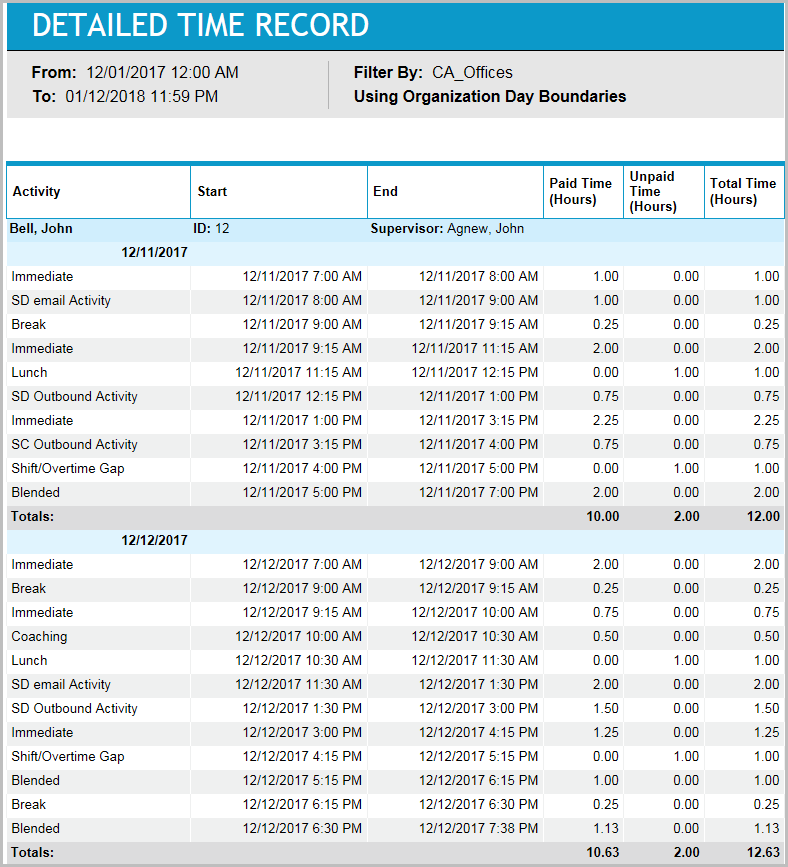
You can use this report to see the details of what an employee did throughout the day. It is particularly useful when investigating issues with employee activity discovered in summary reports, such as the Daily Time Record Summary report.
Inputs
-
Employee Filter: Indicates the set of employees to report on. (This report is in the organization’s time zone.)
-
Time Frame (reports that are by day and in organization time zone):
-
Last <X> days: This field specifies which days to report on. This mode should return the last X completed workdays for an organization; however, as implemented, it sets the From-date to the current day in the time zone of the SQL Server computer minus X days and the To-date to the current day in the time zone of the SQL Server computer. Depending on the difference between the SQL Server computer's time zone and the organization's time zone and day/week boundary, this may not be the last X completed workdays.
-
From/To date (reports that are in organization time zone): These reports are generally by day or by week. Here, by day/week means the organization's workday or workweek, considering day and week boundaries. So, let’s say you want to report on the workdays 1/10/04 through 1/15/04. The workday named 1/10/04 is actually 1/10/04 8:00 a.m. through 1/11/04 8:00 a.m. (in the organization's time zone). It will map differently in GMT. Now, let’s also assume that you are reporting on multiple organizations, each with different time zones and day/week boundaries. You are requesting data on 1/10/04 through 1/15/04, but this could map to different absolute times for each organization. For example:
Org A: 1/10/04 3:00 a.m. - 1/11/04 3:00 a.m., 1/11/04 3:00 a.m. - 1/12/04 3:00 a.m....
Org B: 1/10/04 8:00 a.m. - 1/11/04 8:00 a.m., 1/11/04 8:00 a.m. - 1/12/04 8:00 a.m....
-
Outputs
-
Employee Name: The employee to whom the time records belong.
-
Employee ID: The ID of the employee to whom the time records belong.
-
Manager Name: The employee’s manager.
-
Day: The day to which the time records or time entries belong.
-
Activity: The activity of the time entry.
-
Start Date: The start day of the time entry.
-
Start Time (HH:MM): The start time of the time entry.
-
End Date: The end day of the time entry.
-
End Time (HH:MM): The end time of the time entry.
-
Paid Time (Hours): Returns the paid hours for intersecting portion of time entries.
-
Unpaid Time (Hours): See paid time.
-
Total Time (Hours): See paid time.