Employee Calendar Events
This report returns detailed employee calendar event information for the specified organization or campaign days.
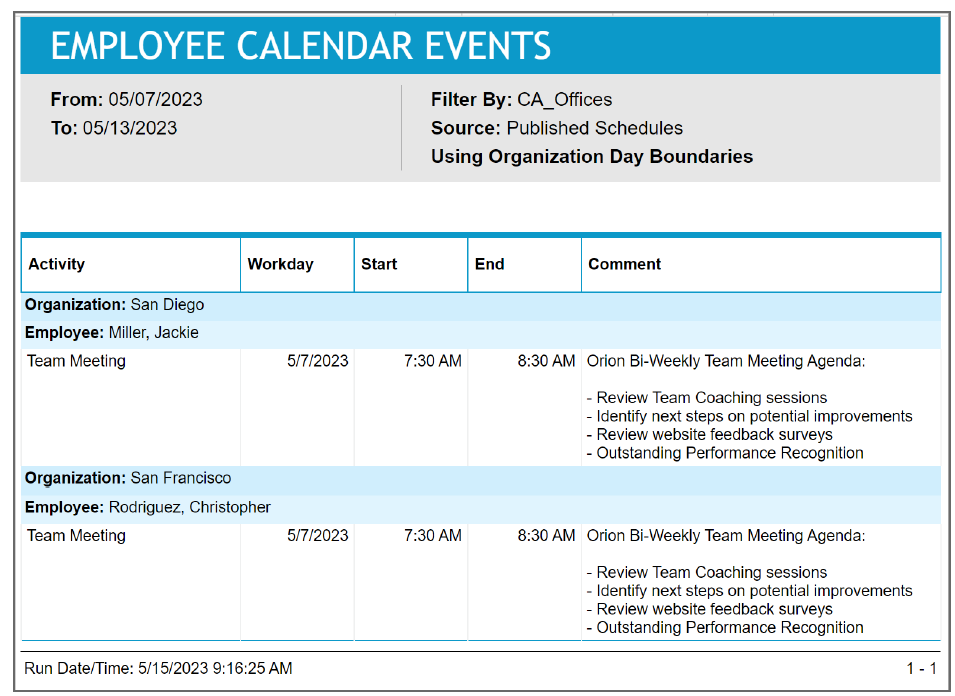
Schedulers can use this report to review what calendar events have been assigned. Filtered instances of this report can be provided to supervisors or managers as a reference for those meetings, training periods, and so on, assigned to their employees. This report can be especially helpful if these supervisors/managers are not given any access to view employee schedules online.
Default Access Rights
This report can be run by the following roles: Scheduler.
Inputs
-
Employee Filter: Indicates the set of employees to report on.
-
Schedule Period (reports that are in view time zone): These reports generally return a single aggregation for the specified time period or a set of records corresponding to all events that start in or intersect the time period.
-
Last <X> days (reports that are in view time zone): This mode returns <X> 24-hour periods starting from current time.
-
From/To date (reports that are in view time zone): Aggregates data for intersecting portion. Only the portion of the events that intersect the specified time window are included in the aggregate. For reports that return events, all events that start in the specified time window are returned.
-
Schedule Period: Applies an additional constraint, that employees must be in the selected week of the campaign or scheduling period.
-
Use Published Schedules: Indicates whether to use published or unpublished schedules.
-
Outputs
-
Employee Name: The name of the employee being reported on.
-
Organization: The employee's organization.
-
Activity: The activity of the calendar event.
-
Workday: The workday that the calendar event begins.
-
Start Time: The time of day that the calendar event begins.
-
End Time: The time of day that the calendar event ends.
-
Comment: Contents from the Comment field on the Calendar event dialog on the Calendar, which is a free text field that provides notes about the calendar event.