Employee Schedule by Employee
This report returns detailed employee schedule information for the specified organization or campaign days.
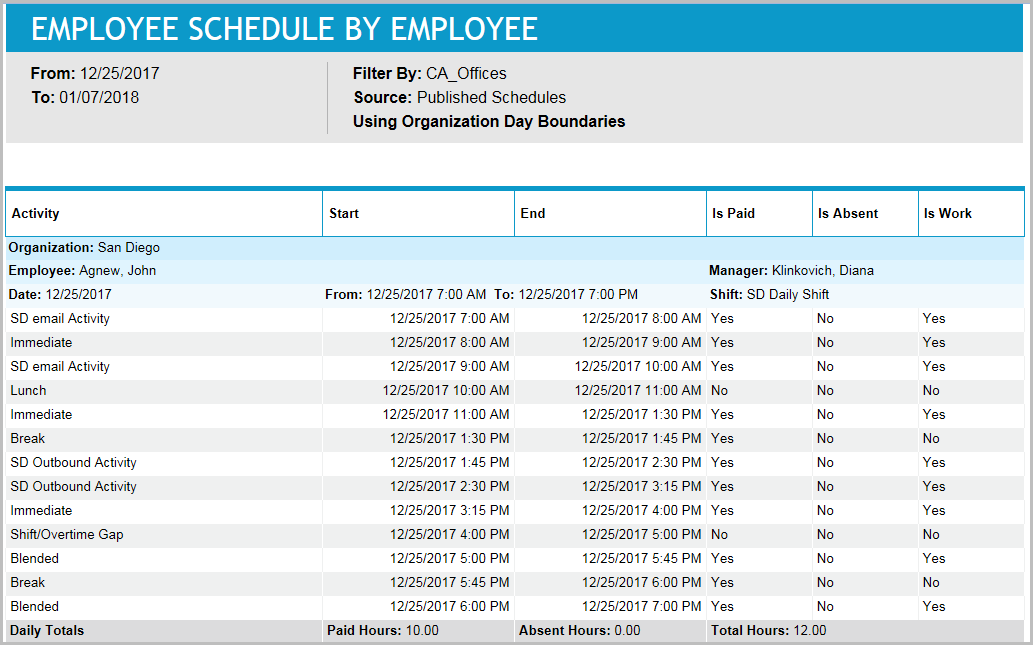
Schedulers can use this report to review employee shift assignments prior to publishing the final schedule. This report can also be used to distribute information about basic employee schedules (days and start/end times, but not activity details) to individuals who do not have access to view schedules online.
Default Access Rights
This report can be run by the following roles: Scheduler.
Inputs
-
Employee Filter: Indicates the set of employees to report on.
-
Schedule Period (reports that are in view time zone): These reports generally return a single aggregation for the specified time period or a set of records corresponding to all events that start in or intersect the time period.
-
Last <X> days (reports that are in view time zone): This mode returns <X> 24-hour periods starting from current time.
-
From/To date (reports that are in view time zone): Aggregates data for intersecting portion. Only the portion of the events that intersect the specified time window are included in the aggregate. For reports that return events, all events that start in the specified time window are returned.
-
Schedule Period: Applies an additional constraint, that employees must be in the selected week of the campaign or scheduling period.
-
Use Published Schedules: Indicates whether to use published or unpublished schedules.
-
Outputs
-
Employee Name: The name of the employee being reported on.
-
Manager: The employee's supervisor.
-
Organization: The employee's organization.
-
Workday: The workday on which the scheduled activity begins.
-
Shift Name: The name of the shift to which the scheduled activity belongs.
-
From: The start date of the shift.
-
To: The end date of the shift. This date might be different from the workday’s if the shift crosses a day boundary.
-
Activity Name: Scheduled activity name.
-
Start Time: Start date of scheduled activity.
-
End Time: End date of scheduled activity. May be different from Workday if shift crosses day boundary.
-
Is Paid: Indicates whether the scheduled activity is paid. A scheduled activity is paid if its underlying event is paid. In most cases, this is the default attribute of the event's activity. For shift activity assignments, the Paid property is taken from the shift activity assignment's parent shift activity. For a time-off event, it is paid if there is a paid shift assignment or shift activity assignment underneath.
-
Is Absent: The following rules control this property:
The topmost event must be a time-off event (this means that the event must have been created through the Calendar module in Forecasting and Scheduling as a time-off event; it is independent of the activity properties).
The event just below the topmost event must be of type work. For example, consider a vacation with a shift assignment underneath. The shift assignment normally has more than one planned event belonging to it, as in Phone 8:00 a.m. - 10:00 a.m., Break 10:00 a.m. - 10:15 a.m., and so on. Because the Phone activity is considered work, 8:00 a.m. - 10:00 a.m. is marked as absent, and because Break is not considered work, 10:00 a.m. - 10:15 a.m. is not marked absent.
-
Is Work: Indicates whether the scheduled activity is considered work.