Employee Schedule by Week
This report returns detailed employee schedule information for the specified organization or campaign days.
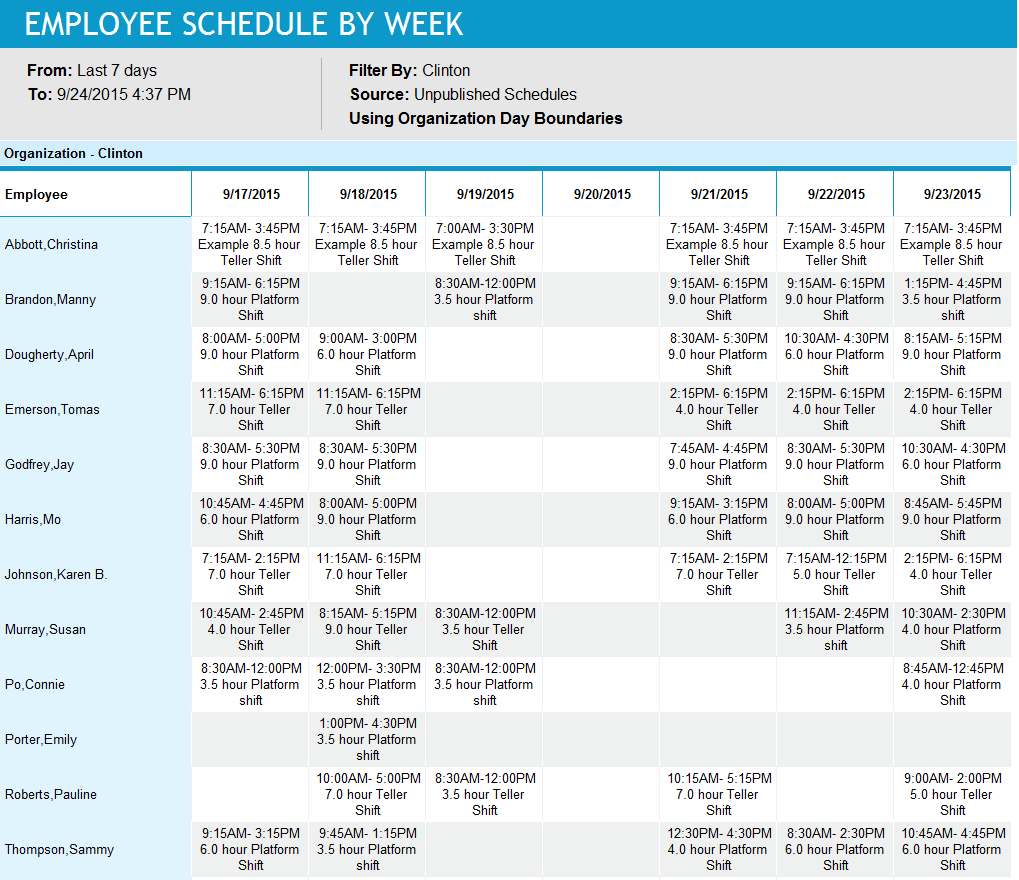
Retail Managers and Retail Regional Managers can use this report to view employee shift assignments in one week intervals per table. It provides the schedules of employees by week at different levels of detail, including Shift, Shift and Lunch, or Shift and All Shift Events. This report can also be used to distribute information about basic employee schedules (days and start/end times, but not activity details) to individuals who do not have access to view schedules online.
Default Access Rights
This report can be run by the following roles: Retail Manager and Retail Regional Manager.
Inputs
-
Employee Filter: Indicates the set of employees to report on.
-
Schedule Period (reports that are in view time zone): These reports generally return a single aggregation for the specified time period or a set of records corresponding to all events that start in or intersect the time period.
-
Last <X> days (reports that are in view time zone): This mode returns <X> 24-hour periods starting from current time.
-
From/To date (reports that are in view time zone): Aggregates data for intersecting portion. Only the portion of the events that intersect the specified time window are included in the aggregate. For reports that return events, all events that start in the specified time window are returned.
-
Schedule Period: Applies an additional constraint, that employees must be in the selected week of the campaign or scheduling period.
-
Use Published Schedules: Indicates whether to use published or unpublished schedules.
-
Level of detail: Select from the following.
-
Shift
-
Shift and Lunch
-
Shift and All Shift Events
-
-
Outputs
Employee schedules by day by employee for each week in the selected period.
-
From: The selected scheduling period from date. The first table displayed will start with this date. A maximum of one week is displayed per table.
-
To: The selected scheduling period to date. This is the last date to display in the table(s).
-
Filter By: The selected employee filter.
-
Source: The selected published or unpublished schedules.
-
Organization: The selected organization for reporting.
Columns
-
Employee: The name of the employee(s) being reported on.
-
Date(s): A column for each day included in the selected scheduling period. A maximum of one week is displayed per table.