Employee Shift Assignments
This report provides, per agent, the shift name, date of work, start time, and end time for the filtered selection and specified time frame.
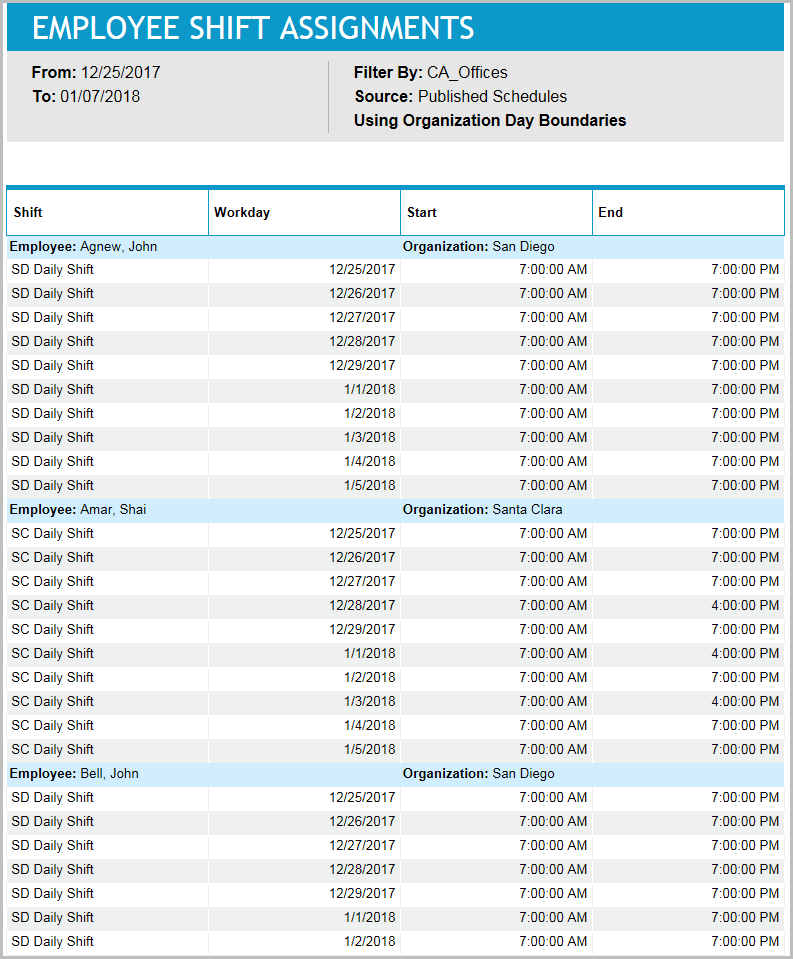
If schedules are created well in advance of the schedule week, and schedulers want to give employees a preview of the schedules without publishing, they can run this report and distribute it so that employees can see expected start and stop times, and what shifts they are working. If there are rules that require certain employees to work specific shifts each week (for instance, Employee must work two to four shifts named 8 1/2 hour shift -2 each week), schedulers might also review this report to see how those scheduling goals were achieved.
Default Access Rights
This report can be run by the following roles: Scheduler.
Inputs
-
Employee Filter: Indicates the set of employees to report on.
-
Schedule Period (reports that are in view time zone): These reports generally return a single aggregation for the specified time period or a set of records corresponding to all events that start in or intersect the time period.
-
Last <X> days (reports that are in view time zone): This mode returns <X> 24-hour periods starting from current time.
-
From/To date (reports that are in view time zone): Aggregates data for intersecting portion. Only the portion of the events that intersect the specified time window are included in the aggregate. For reports that return events, all events that start in the specified time window are returned.
-
Schedule Period: Applies an additional constraint, that employees must be in the selected week of the campaign or scheduling period.
-
Use Published Schedules: Indicates whether to use published or unpublished schedules.
-
Outputs
-
Employee Name: The name of the employee being reported on.
-
Organization: The employee's organization.
-
Shift Name: The name of the shift to which the scheduled activity belongs.
-
Workday: The workday on which the scheduled activity begins.
-
Start Time: The time of day of the start of the shift.
-
End Time: The time of day of the end of the shift. If a shift assignment crosses a day boundary, this field might refer to the next day.