Planned Media Cost (Unburdened)
If you are using multi-media, this report provides information about which employees worked which media, how much of their time was paid work versus unpaid work, and the estimated cost for the media per employee.
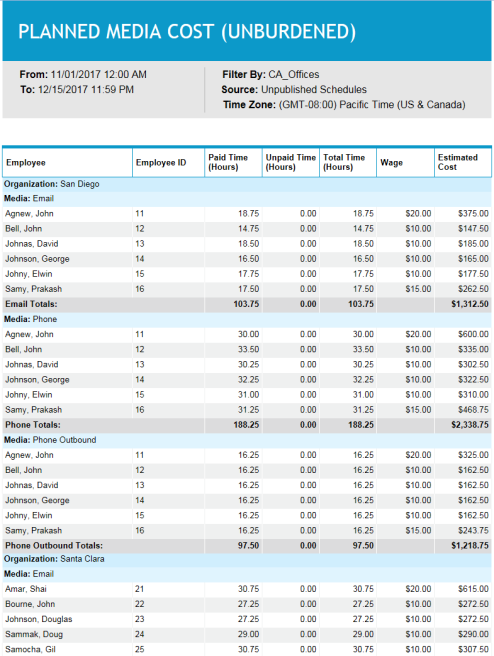
Schedulers or managers can view this report to see how much time is scheduled for handling of each media type over the selected period of time, and how that time is allocated among the employees. They can also see the cost of serving each media type (based on employee wages).
Default Access Rights
This report can be run by the following roles: Scheduler.
Inputs
-
Employee Filter: Indicates the set of employees to report on.
-
Time Frame (reports that are in view time zone): These reports generally return a single aggregation for the specified time period or a set of records corresponding to all events that start in or intersect the time period.
-
Last <X> days (reports that are in view time zone): This mode returns <X> 24-hour periods starting from current time.
-
From/To date (reports that are in view time zone): Aggregates data for intersecting portion. Only the portion of the events that intersect the specified time window are included in the aggregate. For reports that return events, all events that start in the specified time window are returned.
-
-
Time Zone: Indicates the time zone used for display.
-
Use Published Schedules: Indicates whether to use published or unpublished schedules.
Outputs
-
Organization: Name of employee's organization
-
Activity: Activity being reported on.
-
Employee Name: Employee being reported on.
-
Employee ID: ID of the employee being reported on.
-
Paid Time (Hours): Returns the paid hours for intersecting portion of time entries.
-
Unpaid Time (Hours): See paid time.
-
Total Time (Hours): See paid time.
-
Wage: Hourly wage.
-
Estimated Cost: The hourly wage multiplied by the paid time.
-
<activity> Total: The totals for that activity of the Paid Time, Unpaid Time, Total Time, and Estimated Cost.