Planned Staffing Numbers By Interval
This report returns detailed, interval-by-interval planned staffing data by organization. For this report, intervals are 30 minutes.
A row is not returned for an interval if that interval has no data.
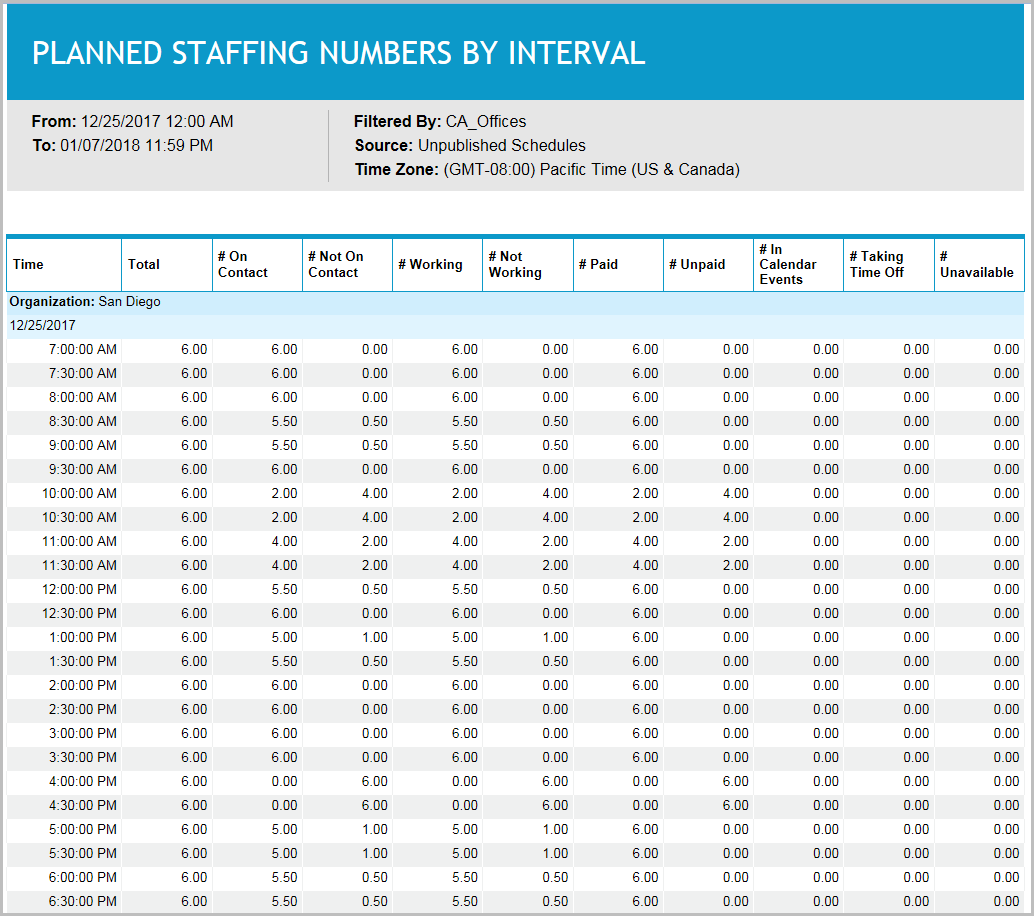
Schedulers can use this report to review the number of agents scheduled in different periods of the day, and to identify periods in which non-contact activities, such as calendar events, time off and unavailability, have an impact on staffing levels.
Default Access Rights
This report can be run by the following roles: Scheduler.
Inputs
-
Employee Filter: Indicates the set of employees to report on.
-
Time Frame (reports that are in view time zone): These reports generally return a single aggregation for the specified time period or a set of records corresponding to all events that start in or intersect the time period.
-
Last <X> days (reports that are in view time zone): This mode returns <X> 24-hour periods starting from current time.
-
From/To date (reports that are in view time zone): Aggregates data for intersecting portion. Only the portion of the events that intersect the specified time window are included in the aggregate. For reports that return events, all events that start in the specified time window are returned.
-
-
Time Zone: Indicates the time zone used for display.
-
Use Published Schedules: Indicates whether to use published or unpublished schedules.
Outputs
-
Organization: The name of the organization on which you are reporting.
-
Date: The date/time of the interval.
-
Total: The total number of full agents that have scheduled activities during the interval. This means that if there are two agents whose schedules intersect the interval by only 15 minutes each, they would be combined to equal one agent.
-
# On Contact: The number of agents that are in activities that are considered Contact Time. Time is considered contact time if the scheduled activity is linked to a media.
-
# Not On Contact: The number of scheduled employees not working on activities associated with a media such as phone, email.
-
# Working: The number of agents that are in activities that are considered Work Time.
-
# Not Working: The number of scheduled employees not working on primary activities such as phone.
-
# Paid: The number of agents that are in activities that are considered Work Time.
-
# Unpaid: The number of scheduled employees assigned to activities which are not paid.
-
# In Calendar Events: The number of agents in activities that were created as Calendar events (for example, using Calendar:New and selecting Calendar Event, Recurring Event, Floating Event, or Class).
-
# Taking Time Off: The number of agents in activities that were created as Timeoff events (for example, using Calendar:New:Time off event).
-
# Unavailable: The number of agents in activities that were created as Unavailable events (for example, Calendar>New>Unavailability).