Productivity & Effectiveness
This report is used to report on data on Operations and Scorecards statistics. You are able to select whether you want the report for actual or scheduled numbers.
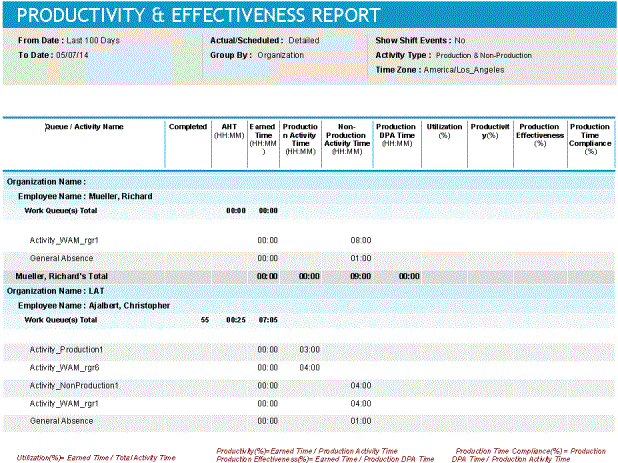
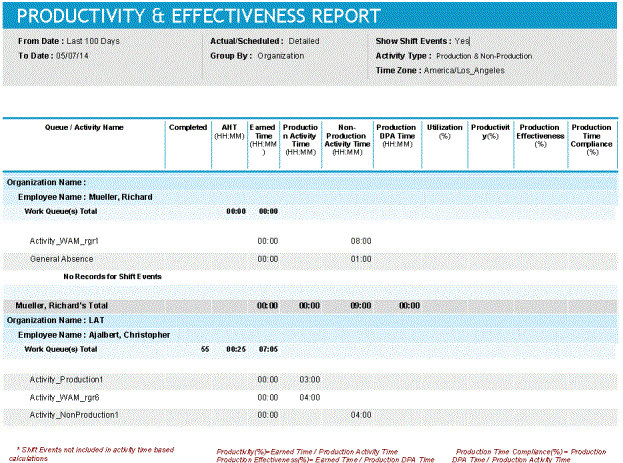
A check box allows you to show shift events on the report.
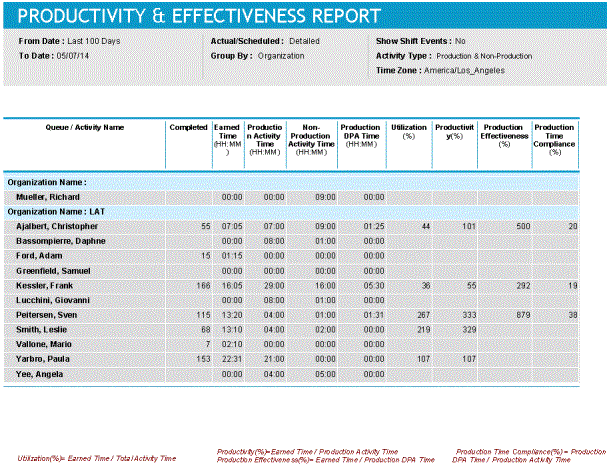
You can also choose to produce a summary report, rather than report the details.
Default Access Rights
This report can be run by the following roles: Manager, Scheduler.
Inputs
-
Employee Filter: Allows you to select or edit existing employee filters at the organization level, or create new ones.
-
Report Type: Allows you to produce a report on the actual numbers or the scheduled numbers.
-
Time Frame: Time span of the report, expressed as one of the following two choices:
-
Last <X> days
-
Date range
-
-
Time Zone: Shows the information based on the time zone you select.
-
Group By: Information can be grouped by supervisor or organization.
-
Time: You can show the information expressed in Hours:Minutes, or Minutes:Seconds.
-
Activity Type: You can choose to display information for Production Activities, Non-Production Activities, or both.
-
Detailed/Summary: You can choose to generate a detailed or a summary report, as shown previously.
-
Show Shift Events: This checkbox allows you to show shift event information on the report.
Output
-
Queue / Activity Name: For each employee, displays in the top rows VCT Queues. In the bottom rows, it displays My Time Activities (Production Activities first, then Non-Production Activities).
-
Completed: Displays integer values for VCT volumes by employee.
-
AHT (HH:MM): Shows the Average Handle Time for the VCT queues.
-
Earned Time (HH:MM): This field is calculated, and shows the completed volume X AHT / 60 (rounded to a minute).
-
Production Activity Time (HH:MM): Displays the time clocked by Production Activity (sums the total minutes clocked).
-
Non-Production Activity Time (HH:MM): Displays the time clocked by Non-Production Activity (sums the total minutes clocked).
-
Production DPA Time (HH:MM): Imported from a Scorecards KPI which uses the Desktop Process Analytics source measure, Total Desktop Productive App Time.
-
Utilization (%): This field is calculated, and shows Earned Time / My Time Total Minutes.
-
Productivity (%): This field is calculated, and shows Earned Time / Clocked Production Time.
-
Production Effectiveness (%): This field is calculated, and shows Earned Time / DPA Production Time.
-
Production Time Compliance (%): This field is calculated, and shows Productivity / Production Effectiveness.
Workforce Management Operations Adapter Guide