Unassigned Agents
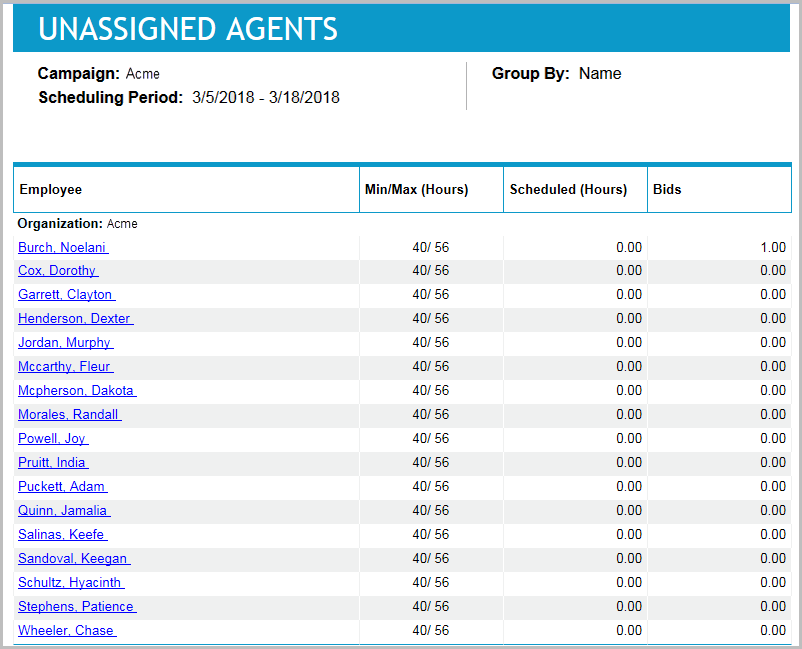
This report lists agents currently unassigned to a schedule, or not currently meeting their minimum hours rule. You can also confirm with this report if agents have entered their bids.
Default Access Rights
This report can be run by the following roles: Scheduler.
Inputs
-
Group and Sort: Which resolution should appear in the report for grouping and sorting. Select Name, Min Hours, or Scheduled Hours.
-
Organization: Which organizations are being reported on.
-
Schedule Period: Which schedule period is being reported on.
Outputs
-
Campaign: <campaign_name>: The campaign by which the schedules are grouped.
-
Week: <start_date - end_date>: The week that is reported on.
-
Organization Name: <organization_name>: The name of the organization by which the schedules are grouped.
-
Employee Name: The agent that is reported on.
-
The name of the employee. It serves as a link to the Skill Schedules Report subreport (see detailed description below).
-
Min/Max hours HH:MM: The ratio between the minimum amount of time that the agent can be scheduled in the scheduled period, and the maximum amount of time that the agent can be scheduled in the scheduled period. For example 30.00/40.00.
-
Hours Scheduled HH:MM: The number of hours scheduled for the agent, for the scheduled period.
-
Bids: The number of bids placed by the agent, for the scheduled period.
As mentioned previously, this report has a subreport:
-
Skill Schedules Report: Lists the skills of an agent, and the proficiency level for each skill.
Outputs
-
Employee Name: <name>: The agent that is being reported on.
-
SkillName: The name of the skill.
-
Proficiency: The proficiency level of the skill.