Vacation Hours
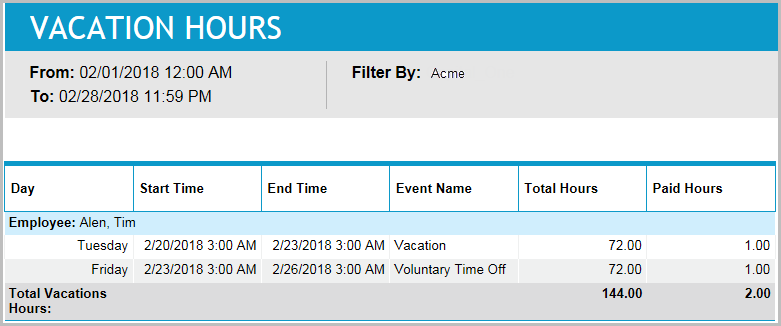
This report returns time-off activity details for the group of employees selected by the filter.
It is in contrast to the report Time Off Summary for Employee,
Inputs
-
Employee Filter: Which employees should be reported on.
-
Time Frame:
-
Last <X> days (reports that are in view time zone): This mode returns <X> 24-hour periods starting from current time.
-
From/To date (reports that are in view time zone): Aggregates data for intersecting portion. Only the portion of the events that intersect the specified time window are included in the aggregate. For reports that return events, all events that start in the specified time window are returned.
-
Outputs
-
Employee name by which the activities are grouped.
-
Day of the week on which the activity falls.
-
Date on which the activity falls.
-
Start Time: Start time of the activity.
-
End Time: End time of the activity.
-
Event Name: The name of the event being reported as vacation.
-
Total Hours: The total number of hours being reported as vacation.
-
Paid Hours: The total number of hours reported as vacation that were paid.
-
Total Vacation Hours: The totals for both Total Hours and Paid Hours.