Weekly Time Bank Balances By Employee
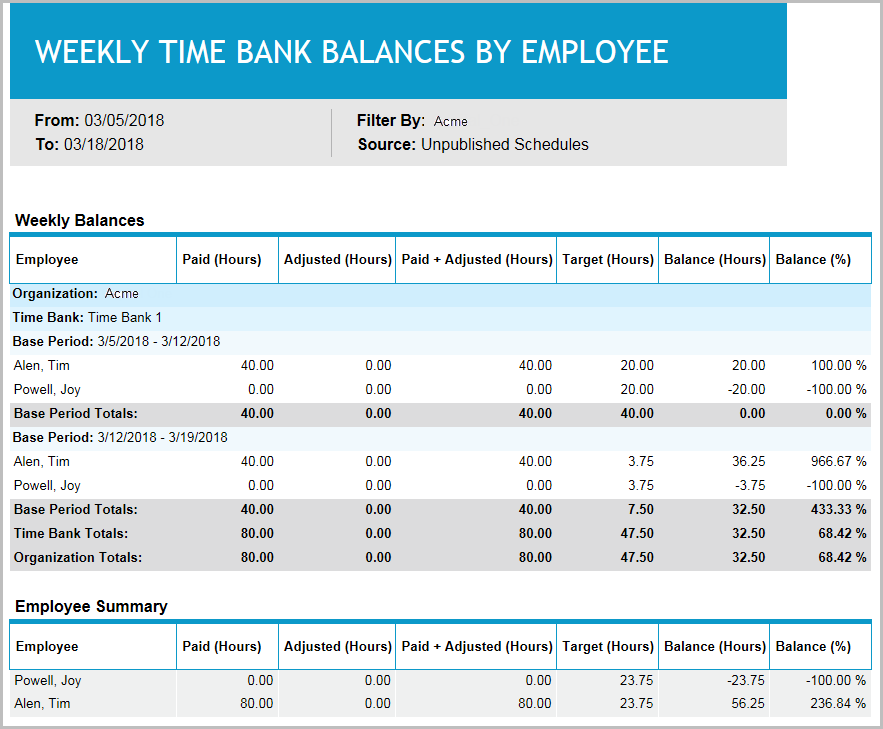
This report provides you with time bank balances for employees.
-
Balances are grouped by base period. A base period generally corresponds to the work week for the organization.
-
Each base period is grouped by the time banks for the organization. The report is intended to provide time bank balances for employees. Use this report to see employees’ time bank balances for any date range.
-
An employee summary is included at the end of the report which aggregates report data by employee.
Default Access Rights
This report can be run by the following roles: Retail Regional Manager and Scheduler.
Inputs
The parameters for this report are the same as the Weekly Planned Time Assessment by Employee report.
The report locates all time banks for the employee that intersect the date range you select for the Schedule Period parameter.
For example, assume the report date range is 1/1/2012 through 6/30/2012, and an employee’s time bank assignments are:
-
Time Bank A (3/1/11 - 2/28/12)
-
Time Bank B (3/1/12 - 2/28/13)
The report will include both Time Bank A and Time Bank B. If you select a schedule period for the Schedule Period parameter (the third radio button option), it will only be used for choosing the date range.
The Schedule Period will only be used for choosing the date range. The schedule period does not filter employees or function in any other way. The output will span the start of any time bank that intersects the time frame, to the end of the last Base Period that does not start after the end date of the time frame.
Outputs
-
Organization: The time bank's organization name. Note that time bank’s organization does not necessarily correspond to be the employee’s organization.
-
Time Bank: The name of a time bank to which the employee is assigned for the report date range.
-
Base Period: The start and end date of the base period, for example, a work week, within the report's date range.
Note the following with respect to base period:
-
Base period is equivalent to the base period in Forecasting and Scheduling.
-
If the start date of the Base Period precedes the start date for the Time Bank, the first Base Period will be the Time Bank’s start date.
-
Each week within the Time Bank's period starts on the day boundary for the organization.
-
If the end date for the Time Bank precedes the end date for the Base Period, the last Base Period will use the time bank's end date. All data in the remaining columns spans only the Base Period you select here.
-
-
Employee Name: Employee's full name.
-
Paid (Hours): Scheduled hours for the employee in the base period.
-
Adjusted (Hours): Any schedule adjustments for the employee within the base period.
-
Paid + Adjusted (Hours): Sum of paid and adjustment hours.
-
Target (Hours): Number of hours the employee is required to work within the base period. The target figure is the same Target Hours shown in Forecasting and Scheduling for the base period.
-
Balance (Hours): Total Paid + Adjustments (Hours) less Target hours.
-
Balance (%): Ratio of Balance hours to Target hours, expressed as a percentage.
Overtime (OT) does not count as paid time (as in Forecasting and Scheduling):
-
Paid time includes only time within a shift assignment.
-
Paid time includes voluntary time off (VTO) and paid vacations.