Prepare SSRS for upgrade to SSRS 2017, 2019 or 2022
In SQL Server 2017, 2019 or 2022, the Reporting Services (SSRS 2017, 2019 or 2022) is a separately installed feature. As part of the preparation, the report server databases and encryption key must be backed up.
Upgrading SQL Server uninstalls the Reporting Services only if the SQL Server and the Reporting Services are on the same machine. If not, it is required to manually uninstall the previous Reporting Services.
Procedure
-
Back up the report server databases, ReportServer and ReportServerTempDB.
-
Back up the encryption key:
-
Open Reporting Services Configuration Manager.
-
Connect to the Report Server Instance.
-
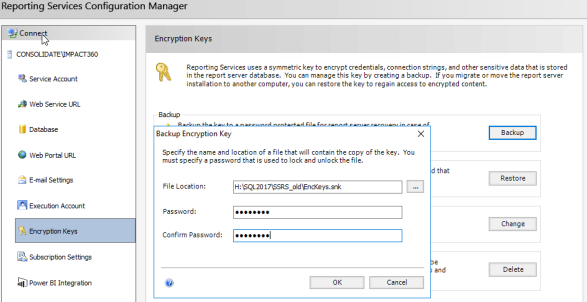
In the Encryption Keys screen, click Backup.
-
In the Backup Encryption Key dialog, set the file location and name for the key backup file.
-
Set a password and note it for later use when restoring the encryption key.
-
-
If the SQL Server and the Reporting Services are on different machines, manually uninstall the previous Reporting Services.