Verify user rights assignments to SQL Services account
Verify the user rights assignments for the SQL services account running the SQL Server Database Engine service.
Procedure
-
In Windows, go to Control Panel > System and Security > Administrative Tools > Local Security Policy.
-
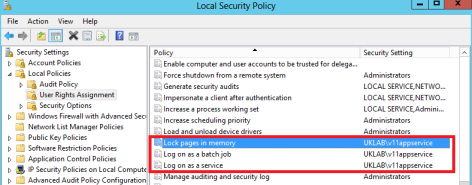
In the Local Security Policy window, click Local Policies, and then click User Right Assignment.
-
Double-click each of the following items, and verify that the list includes the service account running the SQL Server Database Engine service:
-
Lock pages in memory
-
Log on as a service
-
Perform volume maintenance tasks
-
Replace a process-level token
-
Bypass traverse checking
-
SQL Services Account Requirements (Technology, Security, & Network Integration Deployment Reference Guide)
WFO User Rights, Windows Services, and Settings Guide