Configure compression
Compression takes place for all audio input formats except G723.1 (5.3K), and G729A. Compression is not applicable to IP video recording.
G.711 is not supported above 1000 channels.
Audio recording in G.722 format is supported, however it cannot be replayed until it is transcoded into a different format. Use the following procedures to specify the audio compression type for the compression of recordings.
Procedure
-
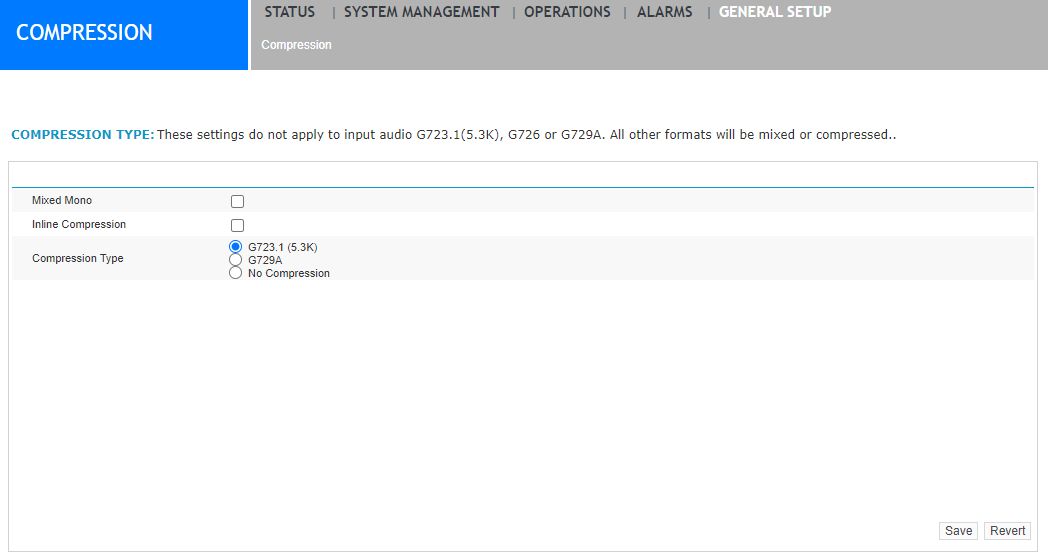
Under General Setup > Compression.
-
Specify the type of compression you want, from the following options (all possible combinations will be valid).
Item
Description
Mixed Mono
Select this check box to enable mixing (applies to IP only). This mode mixes one stereo audio file into one mono audio file to save disk space.
For G.711 and G.722, it is recommended that files are not mixed.
-
enabling mixing produces one stereo energy file in the format .ene. The audio will be a single mono file.
-
switching mixing off produces one stereo audio file.
Inline Compression
This setting must always be enabled. The ability to turn this off has been deprecated and is no longer supported in the product. It will be removed in a future version of the product.
Compression Type
G.723.1 (5.3 K)
This is the recommended audio format. Choose this option to convert audio from the original format to G.723.1 (5.3 K).
See the Performance and Sizing Guide for the audio file sizes produced by the settings above.
-
-
Click Save.