Integration overview for Cisco Webex Meetings
Plan and prepare for integrating the Verint recording solution with Cisco Webex Meetings by understanding the required components, how they communicate, and who is responsible for deploying them.
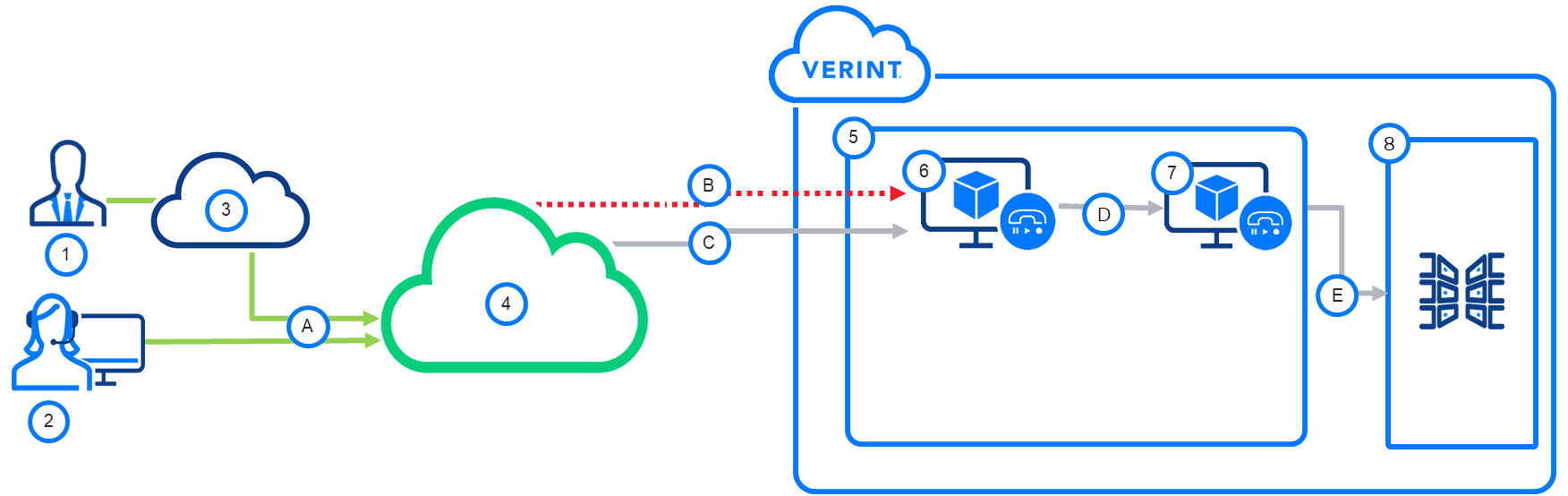
Components
-
Participant
-
Meeting host with computer running Cisco Webex Meetings desktop app
-
Public internet
-
Cisco Webex Meetings Center
-
Verint Recorder
-
Interaction Capture Service
-
Recorder Ingestion Web Service
-
Verint Data Center
Communications
-
A video meeting between the host and one or more Participants on Cisco Webex Meetings application
-
Meeting video (MP4) from application to Verint Recorder through the Cisco Webex Meetings Polling Adapter
-
Meta data over the Cisco Webex Meetings Polling Adapter
-
Interaction updates
-
Interaction consolidation
The customer is responsible for configuring the Cisco Webex Meetings application.
The Verint Recorder retrieves interactions from the application using the Cisco Webex API, which is a set of RESTful APIs.
Call-flow events
Verint polls Cisco Webex Meetings for meetings that have ended, then requests the video and metadata. A typical flow might go like this:
-
When Participants (1) join a scheduled meeting, a personal room meeting, or a webinar in the Cisco Webex Meetings application (4) recording starts automatically.
-
When the Adapter finds a completed meeting, it downloads the MP4 video files (B) and metadata (C) from the application.
-
The meeting recording retrieved is converted to audio and voiceless video.
-
The Verint Interaction Capture Service (6) creates the interaction (session) for the meeting host.
-
The Recorder Ingestion Web Service (7) ingests the audio, the voiceless video, and related metadata into the Verint Data Center (8) for long-term storage.
-
A supervisor uses Interactions menu item to search for customer engagements by any captured metadata, such as agent (as host) name and date of the meeting