Create a member group for Genesys Cloud CX
Create an AudioHook Recording member group for the Genesys Cloud CX data source.
The member group defines the type of capture to perform, and creates an association between the Recorder Adapter Proxy Service (RAPS) and the IP Recorder.
Before you begin
Create a data source for Genesys Cloud CX
Procedure
-
Go to Recording Management.
-
Under Data Source, click Capture Endpoints.
-
Select the Genesys Cloud CX data source that was created previously, and then click Member Group.
-
Click Create and select AudioHook Recording.
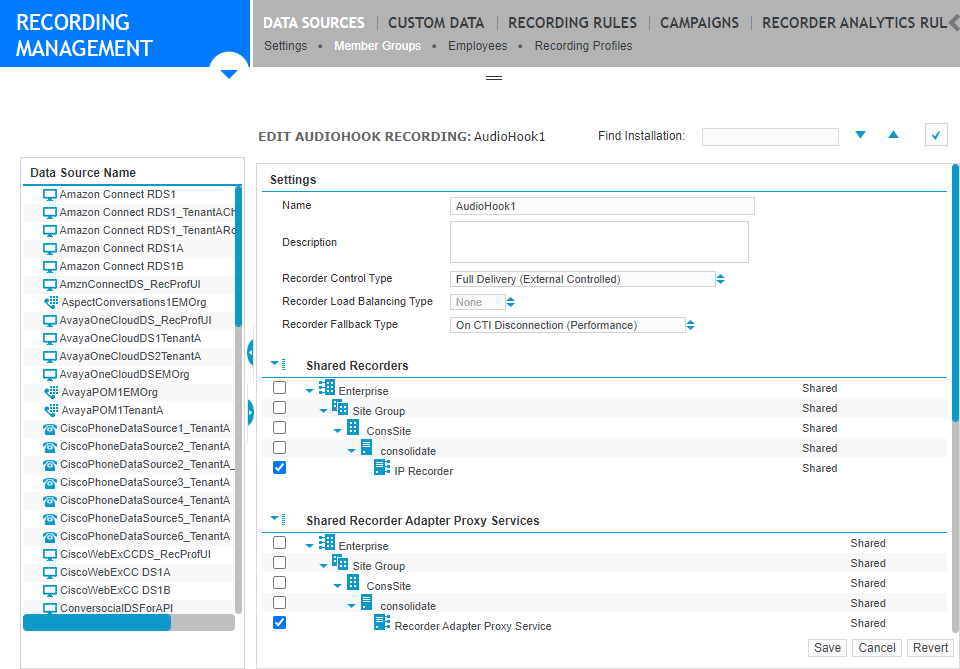
-
Complete the Settings for AudioHook Recording member group
-
Click Save.
What to do next
Add employees to the Genesys Cloud CX data source
Create a Genesys Cloud CX API Adapter
Settings for AudioHook Recording member group
Workflow: Deliver Genesys Cloud events using Genesys Cloud CX API (method 1)