Create capture profile to capture audio from Genesys Cloud CX AudioHook
You may have employees or organizations for whom you want to capture certain interactions types. To reduce effort and simplify administration, you can use a capture profile to define what is captured for specific organizations and employees.
Before you begin
Create a member group for Genesys Cloud CX
Procedure
-
Go to Recording Management. Under Data Source, select Capture Endpoints.
-
In the Data Source column, select the Application (
 ) data source for the platform.
 -
On the Capture Endpoints page, select the Create option.
-
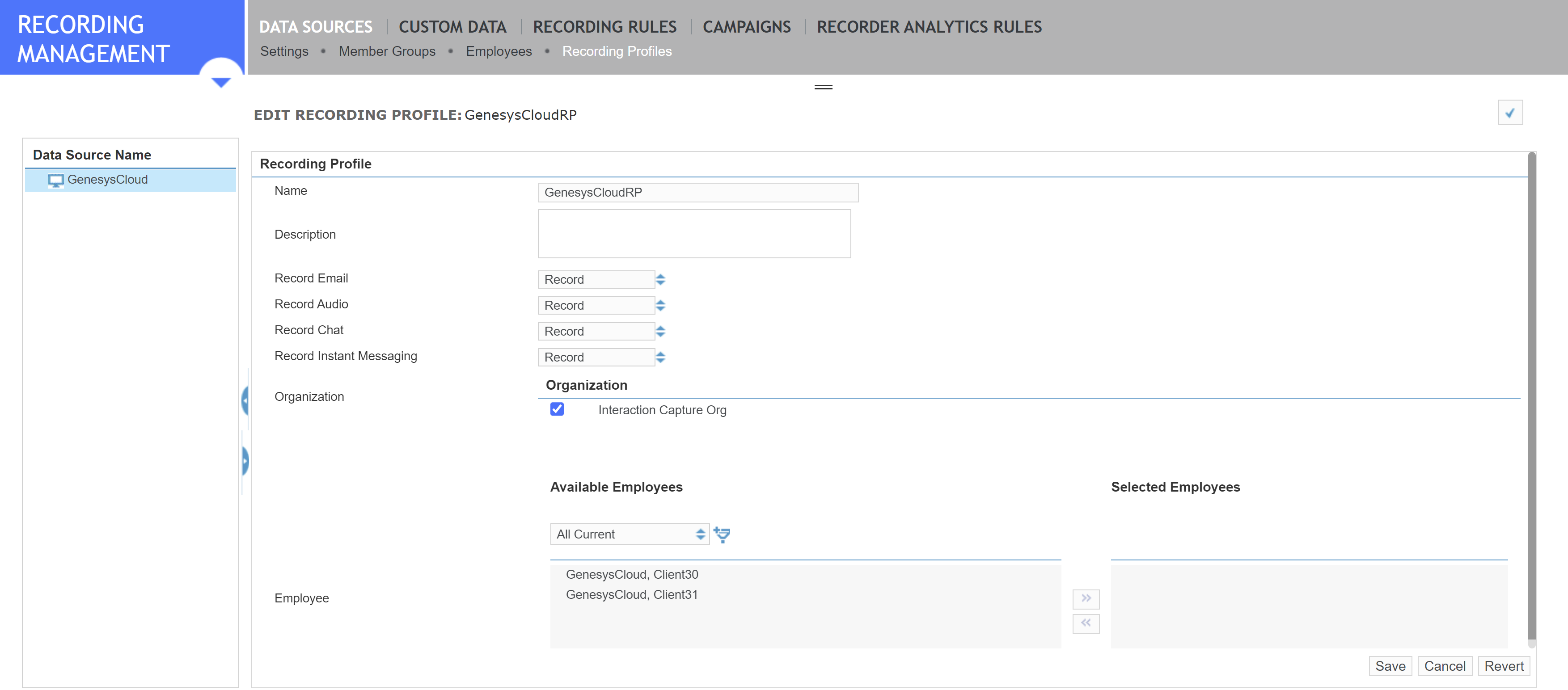
Choose what you want to capture.
Select a check box to enable capturing. Clear a check box to disable capturing.
-
Add organizations, employees, or both.
-
Organization: Organizations are created under Organization Management. You can add multiple Organizations to a single capture profile. Selecting a parent Organization automatically selects its children, but you can clear the child organizations individually.
-
Employee: Employees are set up under User Management. Select one or more employees from the left pane, then use the arrow buttons to move them to the right. If you have many employees, use the filter tool to narrow the selection.
-
-
Click Save.
What to do next
Create a Genesys Cloud CX API Adapter
Workflow: Deliver Genesys Cloud events using Genesys Cloud CX API (method 1)