Create a member group for BYOC Genesys Cloud CX
The member group defines the type of capture to perform, and creates an association between the Recorder Adapter Proxy Service (RAPS) and the IP Recorder.
Create a Gateway Side Correlation Pool member group within the Genesys Cloud CX data source to define the type of recording. The keys used for correlation are "ConversationId" (from CTI) and "x-inin-cnv" (from SIPREC recording).
Before you begin
Configure a custom algorithm on the SBC
Procedure
-
Go to Recording Management.
-
Under Data Sources, click Settings.
-
Select the Genesys Cloud CX data source and then click Member groups.
-
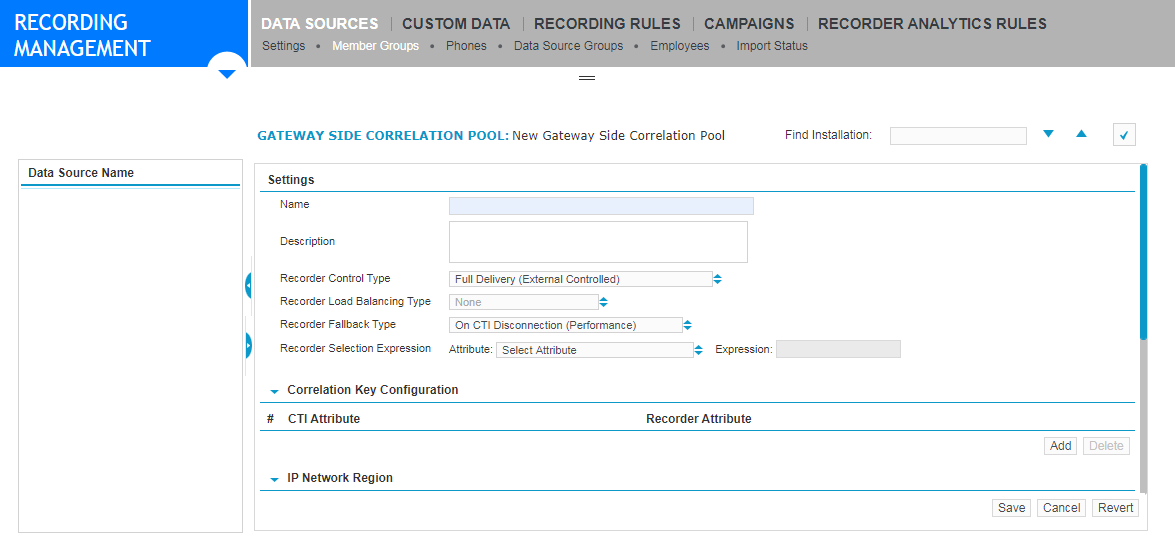
Click Create to create a Gateway Side Correlation Pool member group.
-
Complete the settings, referring to "Gateway side correlation pool member group settings" in the Recorder Configuration and Administration Guide.
-
Click Save.
Recorder Configuration and Administration Guide
What to do next