Use case 7: Associating external audio recording with Verint screen recording
You can use the Multimedia Ingestion API with the Engagement Capture Notifications API to ingest external audio recordings and associate them with the Verint screen recordings. Once associated, the audio and screen recordings are treated as part of the same interaction; they can be replayed together.
Association process
To create the association between the screen and audio sessions, the custom application uses the Engagement Capture Notifications API to monitor call and screen recordings sessions in real time. Session recording events are returned to the custom application. The custom application caches this information to match the screen recording with the audio.
After the screen recording completes and the external audio recording is available, the custom application uses the Multimedia Ingestion API to ingest the audio. It adds metadata from the cached screen capture session to identify the screen recording to associate the audio recording with.
Sequence Diagram
The following diagram shows the overall flow between the custom application and the two Verint APIs. The application interacts with the Engagement Capture Notifications API to monitor and cache the Verint screen recording sessions. These sessions are referenced in the Multimedia Ingestion API request to ingest the audio files.
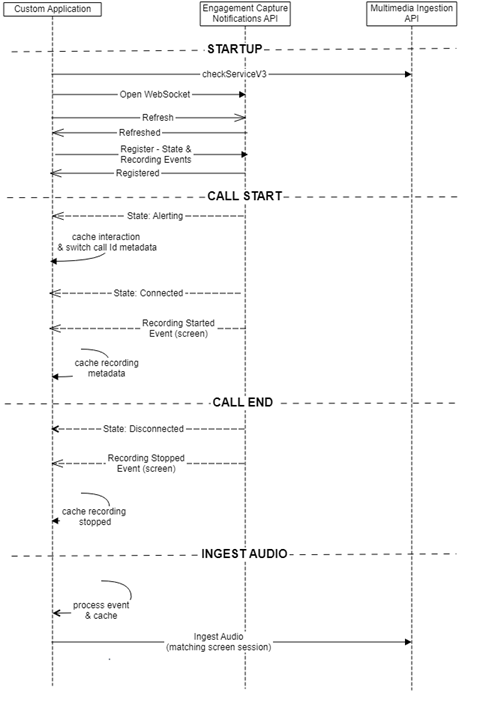
Application startup
The custom application must initialize the Multimedia Ingestion API and the Engagement Capture Notifications API.
Multimedia Ingestion API
For the Multimedia Ingestion API, use the checkServiceV3 call to confirm that Ingestion has been enabled and set up correctly.
Engagement Capture Notifications API
For the Engagement Capture Notifications API, use a sequence of requests to create and prepare the WebSocket for event generation:
-
Send an HTTP GET request to the notifications resource on the secure gateway. Upon receipt of the request, the API upgrades the request to a WebSocket connection.
-
Following registration and periodically, to keep the WebSocket open, send a Client Refresh message.
Copy{
"refresh": {
"requestId": "63BD6878-02E2-46BD-B92C-5459051B482C",
"timestamp": "2016-08-22T10:52:13Z"
}
}The response message contains a timeout field with the remaining number of seconds that the socket will remain open.
Copy{
"refreshed": {
"requestId": "63BD6878-02E2-46BD-B92C-5459051B482C",
"success": true,
"timestamp": "2016-08-22T10:52:14Z",
"timeout": 60
}
} -
Before the timeout expires, to ensure the WebSocket stays open, send another refresh message.
-
Register for state and recording notifications for the configured data source.
Copy{
"register": {
"requestId": "W162EWWdh0GzoFaitOtQwg",
"filterId": "fmDFMZrqWUuGmPNJGpcUmA",
"notificationType": "interactions",
"dataSources": {
"id": "51"
},
"fieldChangeFilter": {
"enableDefaultFields": false,
"includedFields": ["state", "recordings"]
}
}
}State and recording events are now enabled on the WebSocket connection and available for the custom application to read and process.
-
When closing down the application, unregister for events.
Session monitoring and caching with the Engagement Capture Notifications API
The Engagement Capture Notifications API can monitor session and recording events in real time. To ensure that screen recording session metadata is available when the audio is ready for ingestion, the custom application must cache these sessions.
For session information to be cached, the application must parse the following events:
|
Event |
Data to parse |
Usage |
|---|---|---|
|
Alerting eventType in interaction.attributes contains “ALERTING” |
interaction.id, (interaction.activeCall.globalCallId, interaction.activeCall.externalId or interaction.switchCallId), interaction.startTime, |
The first notification for a new call. Use this notification to create a session in the cache containing the id, a global/switch/external id, the employee id, start time and contactId. |
|
Connected eventType in interaction.attributes contains “CONNECTED” |
interaction.id |
Update cached session state. |
|
Recording Started (detect with interaction.recordings[0].closed == false) |
interaction.id, |
Look for single recording only with ”screen/vnd.verint.capb" in mime to identify screen recording in progress. Update cached call with the inum of the screen recording and closed status (false). |
|
RecordingStopped (detect with interaction.state == “CLOSED”) |
interaction.id, |
Look up cached session based on id and mark session as closed. |
|
Disconnected eventType in interaction.attributes contains “DISCONNECTED” |
interaction.id |
Call has ended. Screen recording may still be in progress. |
When screen recording has completed with RecordingStopped, and the audio is available for ingestion, you can then use the cached metadata in the ingestion.
Audio ingestion with the Multimedia Ingestion API
Following completion of the Verint screen recording and assuming that the matching audio is available, use the cached session information to generate the metadata to send to the Multimedia Ingestion API.
First, construct the metadataUploadV3 request and send it to the API. The JSON body of the request includes parameters that instruct the ingestion API to associate the audio recording with the screen recording.
The additional and modified parameters at contact level are:
contacts: [{
    parent: "false"
    markcontactfromchild: "true"
id: <screen_contact_id_here>-
Add the parent with hard-coded false.
-
Add the markcontactfromchild with hard-coded true.
-
Set the id to the cached contactId from the screen recording.
The additional and modified parameters at session level are:
Sessions: [{
    parent: "false"
    marksessionfromchild: "true"
    primaryinum: "screen_inum_here"
    parentinum: "screen_inum_here"
    id: "<screen_session_transaction_id_here>"
start_time: "<screen_session_start_time_here>"-
Add the parent with hard-coded false.
-
Add the markcontactfromchild with hard-coded true.
-
Set the primaryinum and parentinum parameters to the cached inum value from the matching screen recording.
-
Set the id to the cached contactId from the screen recording.
-
Set the start_time to the cached startTime of the screen recording.
An example of the body format, including additional parameters, would be as follows:
{
    contents: [{
        index: integer(int32)
        duration: integer(int32)
        original_filename: string
        data_source: string
        capture_type: string
        system_type: string
        source_type: string
        start_time: string
        end_time: string
        content_type: string
        satellite_tags: [{
            tags: {
                attributes: {}
            }
        }]
        tags: [{
            attributes: {}
        }]
        new_content_attribute_key: string
        swap_audio_channels: boolean
    }]
    contacts: [{
        start_time: string
        end_time: string
        duration: integer(int32)
        parent: "false"
        markcontactfromchild: "true"
        sessions: [{
            complete: boolean
            keep: boolean
            interaction_type: string
            start_time: "<screen_session_start_time_here>"
            end_time: string
            duration: integer(int32)
            direction: string
            pbx_login_id: string
            extension: string
            cti_seen: string
            switch_call_id: string
            switch_id: integer(int32)
            agent_id: integer(int32)
            parent: "false"
            marksessionfromchild: "true"
            primaryinum: "screen_inum_here"
            parentinum: "screen_inum_here"
            tags: [{
                attributes: {}
            }]
            id: "<screen_session_transaction_id_here>"
            satellite_tags: [{
                tags: {
                    attributes: {}
                }
            }]
            organization_id: integer(int32)
        }]
        id: <screen_contact_id_here>
    }]
    type: string
    encrypted: boolean
}
You can now upload the audio using the fileUploadV3 request to the location returned by the metadataUploadV3 request.