Integration Overview for capture from Microsoft Dynamics Omnichannel
Understand the components required to integrate the Verint capture solution for Microsoft Dynamics Omnichannel and how the components communicate.
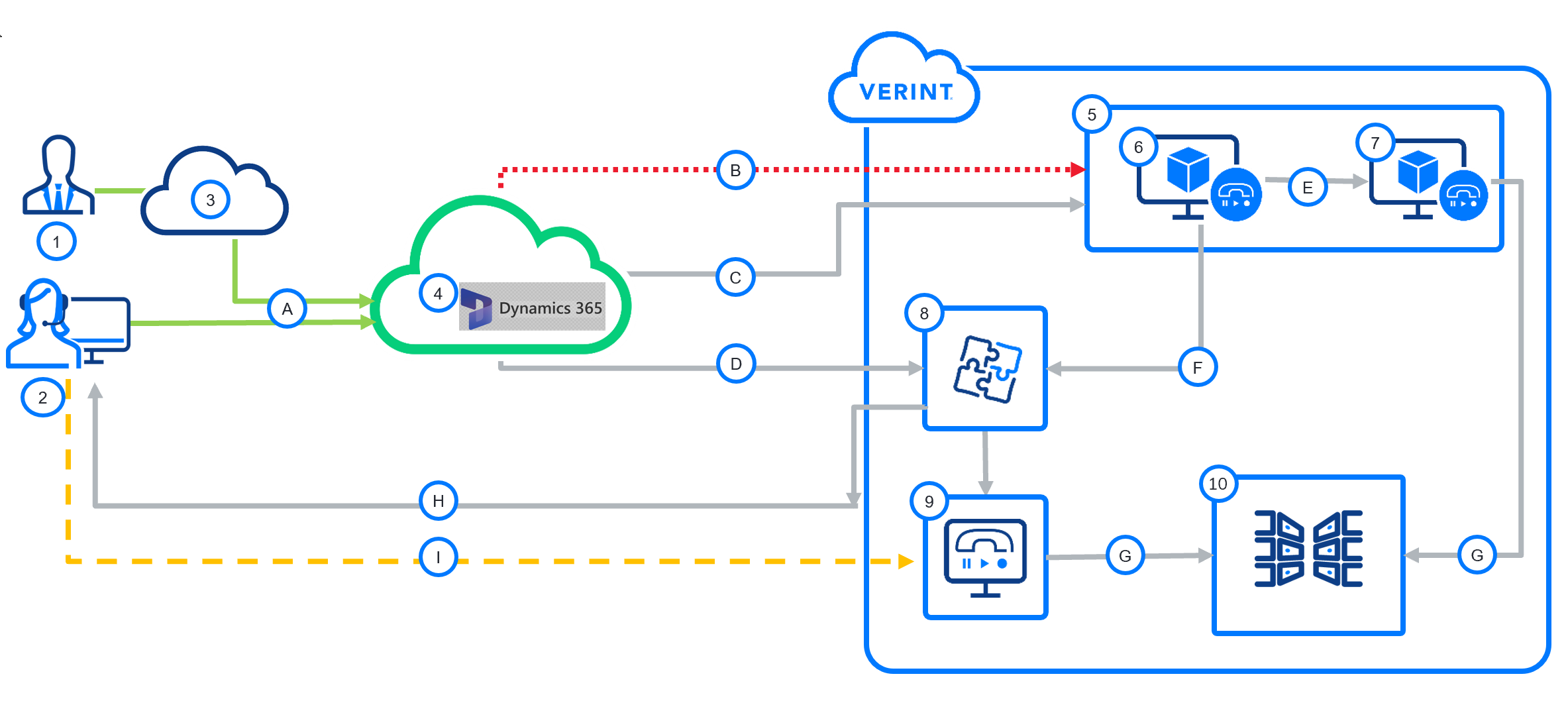
Diagram: post-call audio and real-time screen capture
|
Components |
Communications |
|---|---|
|
|
The customer is responsible for configuring the Microsoft Dynamics Omnichannel.
Sequence for audio capture
The following sequence of events demonstrates how Verint captures call audio from the Microsoft Dynamics 365 platform:
-
A SIP call (A) between a Customer (1) on the PSTN (2) and an Agent (3) on the Microsoft Dynamics 365 platform.
-
The Verint Interaction Capture server (6) hosts the Dynamics Omnichannel Polling Adapter. The Adapter regularly polls the MS Dynamics API server for completed recordings.
-
When the Adapter receives a call record (C) for a Completed call event, it retrieves the call metadata (C) and audio files (B) from the Microsoft Dynamics 365 platform.
-
The Recorder Ingestion Web Service (7) consolidates call audio for all related interactions (transfers and conferences) linked with the same call session ID (as provided by MS Dynamics API server).
Sequence for screen capture (D, H, I, & G)
The following sequence of events demonstrates how Verint captures screen activity from the Microsoft Dynamics Omnichannel platform:
-
When the Integration Service (8) receives a call Ringing event (D) from the Microsoft Dynamics Omnichannel, the Verint Recorder RIS (8) sends a command (H) to the Verint Agent Desktop service (2) to start recording the screen.
-
The Agent desktop service streams the screen to the Screen Recorder (9), which hosts the LAN Data Source.
-
The Integration Service (8) responds to events from the Microsoft Dynamics Omnichannel (F) as follows:
Agent event
Service response
Ringing
Start recording: Create a SCN file in the call buffer on the Recorder (5).
Not Responding
Stop recording: Delete the SCN file.
Connected
Continue recording. Mark the SCN file to be kept.
Conferencing, Consulting, Consult Done, On Hold, Hold Done, and Wrap Up
Continue recording.
Agent Available
Stop recording. Notify Interaction capture (F).
-
The Recorder Ingestion Web Service (7) stitches the call audio and screen activity together (G) and sends the files to the Verint Data Center for long-term storage.
-
Your personnel can replay the call audio and associated screen activity using Verint Interactions and Risk Management.