Work with a saved search
You can view, edit, or delete your saved searches.
Procedure
-
In the Search workspace, go to Saved Searches.
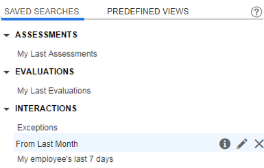
-
Under Assessments, Evaluations or Interactions, point to the saved search you want to view, edit, or delete.
-
Do one of the following:
-
To view the saved search results, click the saved search link.
-
To view the saved search criteria, point to the information icon
 .
. -
To edit the saved search criteria, click
 , change any of the search fields, and do one of the following:
-
To update your saved search, click Save Search
-
To save as a new saved search, click Save As and enter a new name for your search
-
-
To delete your saved search, click
 .
.
-