Interaction Analytics Export transcript formats
Each exported transcription file contains a number of JSON files, one for each transcribed interaction that is included in the export. The name of each JSON file corresponds to the call’s transaction ID. Each JSON file has three versions of the same transcription, each in a different format.
plainText
In this format, the whole transcription appears as a single sequence, without additional details. This format uses \n as a separator when the speaker changes.
For example:

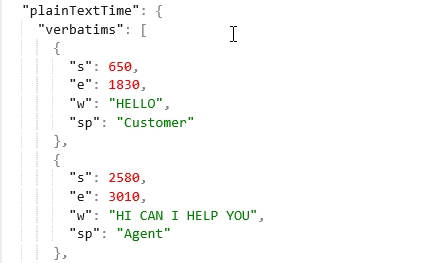
plainTextTime
In this format, the transcription includes the details of the speaker and start and end time, and the sections are separated for each speaker.
For example:
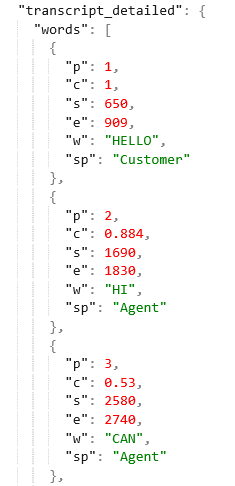
transcript_detailed
In this format, each word is presented separately, with details such as the speaker, the word’s position, and start and end time.
For example:
|
Key name |
Definition |
Example |
Meaning of the example |
|---|---|---|---|
|
"p" |
The index in which the word appears in the transcript. 1 is the first word, 2 is the second, and so on. |
"p":14 |
This is the 14th word of the call |
|
"c" |
A value between 0 and 1 that indicates the confidence that this is the correct word |
"c":0.88 |
There is 88% probability that this word is correct |
|
"s" |
Start time (in milliseconds) |
"s":2200 |
The start time of this word was 2200 milliseconds from the start of the recording |
|
"e" |
End time (in milliseconds) |
"e":2300 |
The end time of this word was 2300 milliseconds from the start of the recording |
|
"w" |
The transcribed word\words |
"w":"Hello" |
The transcribed word is "Hello" |
|
"sp" |
The speaker—for example, agent, customer, simultaneous |
"sp":"Agent" |
The speaker is the agent |