Create a recording rule to route interactions to real-time voice bots
Create a rule that routes qualifying interactions to one or more real‑time voice bots. Bot Engagement rules stream interactions to the selected bots so they can analyze, classify, or enhance calls based on their configured capabilities. Only licensed and provisioned bots appear for your organization.
Before you begin
Your organization must have real-time voice bots licensed and provisioned; otherwise, the Bot Engagement option does not appear.
To use bot routing, interactions must already be captured by a recording rule. If you need to set up a recording rule, refer to Create a recording rule.
Procedure
-
In Enterprise Manager, open the Recording Management module.
-
Select Recording Rules > Settings, and then choose Create.
A new rule configuration page opens.
-
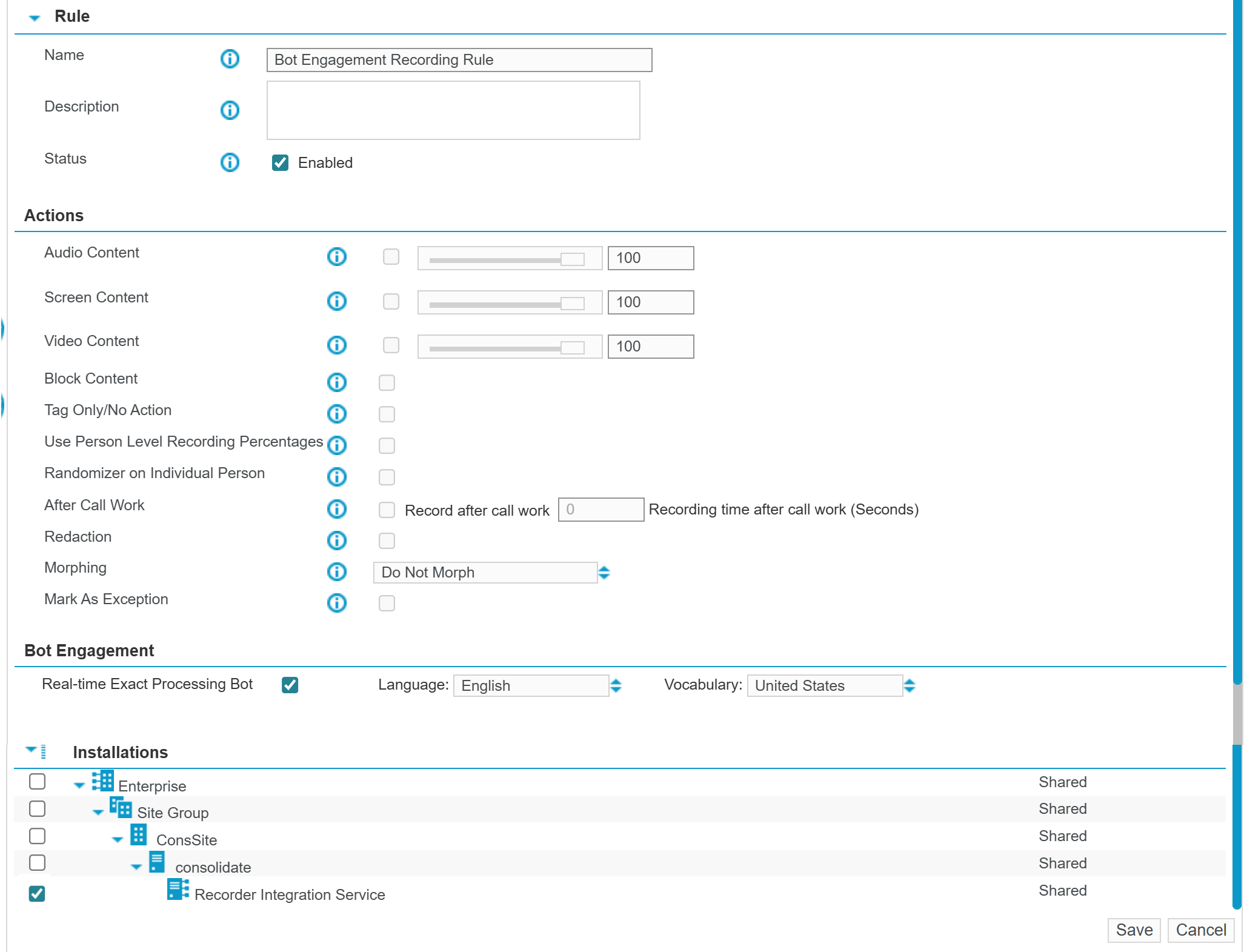
In Name and Description, enter a name (required) and a description (optional).
-
To make this rule available immediately, in Status, select Enabled.
A cleared check box keeps the rule inactive.
-
Under Bot Engagement, select the real-time voice bots you want this rule to use.
If the Bot Engagement option is unavailable, clear all options selected in the Actions section. Bot Engagement rules do not support recording actions such as recording, blocking, redaction, or morphing.
-
When a selected bot supports language settings, choose the Language and Vocabulary that match the expected language of customer calls.
All selected bots must use the same Language and Vocabulary settings.
-
Under Installations, select where you want the rule to apply: individual Integration Services, entire sites, or across the enterprise.
-
Select Save.
What to do next
Create conditions for a recording rule.
Create a schedule for recording rules
When the Bot Engagement rule is completed, you can add triggers based on conversational patterns by adding a recorder analytics (RTA) rule using the Common Real-time Streaming (CRTS) engine.