Enrollments report
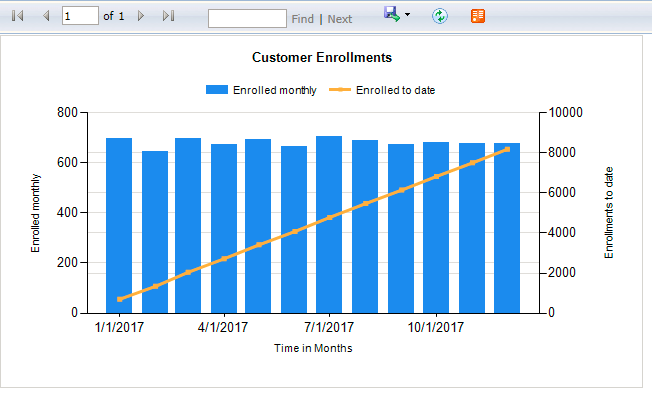
The Enrollments report illustrates the rate of enrollments by period relative to cumulative enrollments to date for the organization. Enrollment is the process of registering a customer, employee, or target in the IAFD system. A person must be enrolled before voice biometric analysis can occur.
-
A bar chart shows enrollments for each time period.
The left, vertical axis shows enrollment volume for the bar chart. You typically see an initial spike in enrollments as people (customers, employees, or targets) are first enrolled.
-
For the same period, a line graph shows cumulative enrollments for the organization.
The right, vertical axis charts enrollment totals for the line graph. Cumulative enrollments typically rise sharply and then flatten out gradually over time.
Report parameters
|
Parameter |
Description |
|---|---|
|
Date Range |
Set the date range of the report to determine the data included. Enter the date range manually (in the format mm/dd/yyyy) or click |
|
Enrollment Type |
Determine the enrollment type by selecting one of the following:
|
|
|
Choose the interval by which report data aggregates. Aggregate by days, weeks, months, quarters, or years. The default is by month. |
 to select a date range using the date picker.
Default report access rights
By default, this report can be run by the following roles: Administrator, Analyst, Enterprise Manager Admin.
IAFD (Identity Authentication and Fraud Detection) widgets (Dashboards Administration and User Guide)
IAFD reports and widgets (Real-Time Analytics Framework Configuration and Administration Guide)