Verifications report
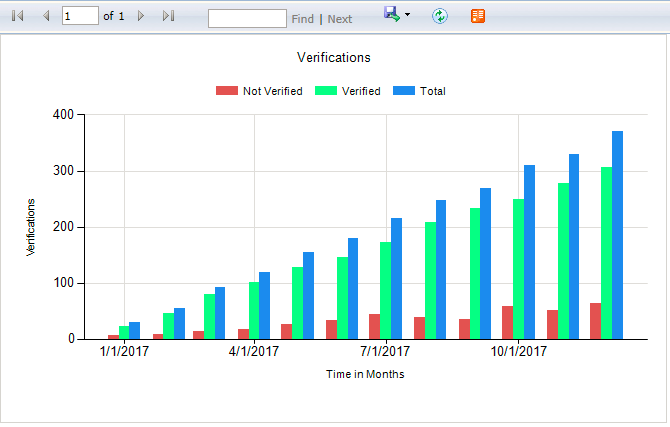
The Verifications report provides a visual representation of verification success and failure rates for interactions aggregated by period for employees and customers.
-
A bar chart shows verified and unverified interactions for each time period based on the verification score threshold configured for the report. You can also see the total number of interactions, which is the sum of verified and unverified.
-
To visualize the impact different minimum verification scores have on the verification rate, adjust the report threshold score.
Report parameters
|
Parameter |
Description |
|---|---|
|
Date Range |
Set the date range of the report to determine the data included. Enter the date range manually (in the format mm/dd/yyyy) or click |
|
Threshold |
Determines the minimum verification score required for a successful verification to be reported. The default threshold is 5. Verification score values can range from -100 to 100.
|
|
|
Choose the interval by which report data aggregates. Aggregate by days, weeks, months, quarters, or years. The default is by month. |
 to select a date range using the date picker.
Default report access rights
By default, this report can be run by the following roles: Administrator, Analyst, Enterprise Manager Admin.
IAFD (Identity Authentication and Fraud Detection) widgets (Dashboards Administration and User Guide)
IAFD reports and widgets (Real-Time Analytics Framework Configuration and Administration Guide)