Optional: Roll back language model
In Connected mode, roll back the language model to either its base version or to the previous version of the model you created on the Speech Transcription server, and redistribute the selected version to all the Transcription servers.
After building and distributing the new language model, you can always perform rollback to restore an earlier version of the model. The Speech Transcription server on which you build the model, automatically saves up to two previous versions of the language model in separate folders.
Before you begin
Optional: Distribute RTSA language model
Procedure
-
Do one of the following:
-
To roll back to the base model, go to the Primary Transcription server on which you distributed the base model, and continue with step 4.
-
To roll back to a previous version of the language model you built, continue from step 2.
-
-
On the Transcription Server on which you built the model, go to:
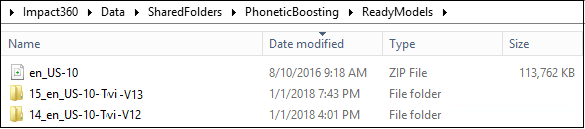
%Impact360DataDir%\SharedFolders\PhoneticBoosting\ReadyModels
The ReadyModels folder shows:
-
All models that have been distributed, including the base model for the current language and vocabulary.
-
The last two versions of the models on the Transcription server in different subfolders. The name of each subfolder is in the format:
<server_version>_<model_name>_<model_version>
where:
-
<server_version> is the version of the model that exists on the Transcription Server. The higher the number, the more recent the version.
-
<model_name> is the concatenation of the language model and the Customer Name.
-
<model_version> is the version of the language model.
-
-
-
Do the following:
-
Open the subfolder with the model to be restored.
-
Copy the model file and paste it into ReadyModels root.

-
-
Distribute the language model, as described in “Load a language model to the primary transcription server” in the Language Model Configuration and Distribution guide.