Reprocess call date ranges
Use the following procedure to reprocess Contact database call date ranges or Text Analytics database call and content date ranges to allow the Recorder to re-execute their tasks on an older set of calls and content specified by date range.
Please note the following:
-
Reprocessing should not be performed during normal operation and should not be done without consulting support.
-
Centralized Archiving drives do not support the reprocessing feature. (You should use a modified campaign in this instance.)
-
For Archive drives only:
-
The archive drive status must be Ready or Writing before beginning reprocessing. If the state is Empty, Faulty, Unknown, Full, Replay, or Reconstructing, you cannot reprocess.
-
The Archive drive status page that already shows the last archived Inum continues to track the last archived Inum while reprocessing.
-
-
You must have “View Workflow Configuration” privileges to use the Start Reprocessing and Stop Reprocessing functions.
Procedure
-
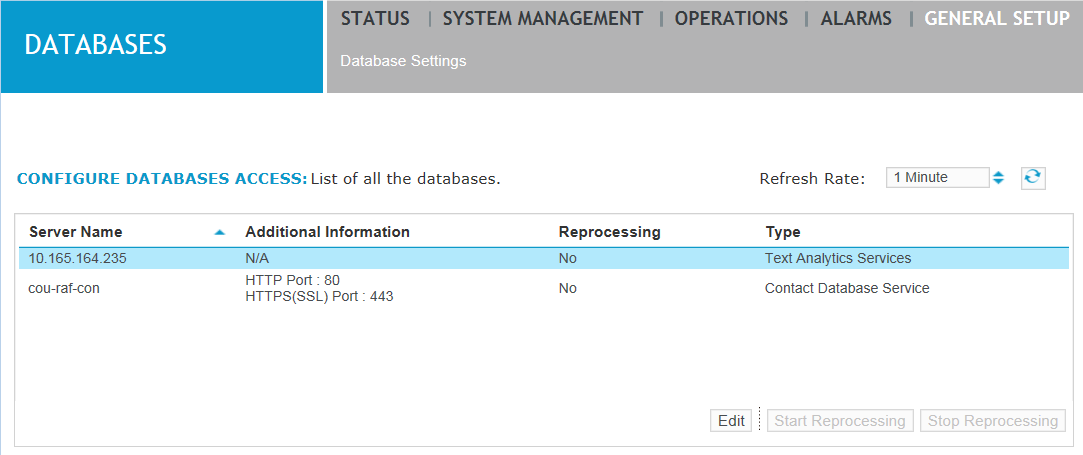
Click General Setup > Databases > Database Settings.
-
Select a database and click Start Reprocessing.
-
Type a start and end date and time to be the date range, observing the following:
-
Date and time formats are automatically converted to the proper format according to local convention. You can also click the Calendar icon (circled) to display a visual representation of dates.
-
The date range indicates the approximate beginning and ending range of call times that will be reprocessed.
-
The start date must always be earlier than the end date.
-
All dates and times are specified in the user's local time zone.
-
-
Click Start. Reprocessing begins. If you attempt to start reprocessing again on a database or Archive drive that is already reprocessing, an error message appears.
-
Click Stop Reprocessing to interrupt reprocessing. The target Consolidator database or Archive drive will return to its original progress point before the reprocessing operation began and continue from there.