Set up high availability for CipherTrust Manager
Set up high availability by deploying two servers, creating a cluster on the primary server, then joining the secondary. Once synced, both servers run together for continuous availability.
Before you begin
-
Deploy two CipherTrust Manager servers— a primary and a secondary—both with root administrator credentials, and bi-directional network connectivity on TCP port 5432.
-
Workflow: Configure CipherTrust Manager
-
On each server, complete the following initial setup steps: Change the host name, Upload the license, Upload SSL certificates, Configure NTP (Network Time Protocol).
-
On the primary server only: Create domains and domain administrators for Enterprise Manager, Create a backup key, and Configure an automatic backup schedule.
-
On the secondary server, import the backup key used by the primary server for the automatic backup schedule.
-
Procedure
-
On the primary server, sign in to Web UI using a root domain account.
-
Go to Admin Settings > Cluster, select Manage cluster, then select Add Cluster.
-
On the Introduction page, click Next.
-
On the Add Cluster page, provide the connection information of the primary server, then click Add Cluster.
-
On the Cluster page, confirm that the newly added primary node is listed as a Host and has a status of Ready.
-
Select Manage cluster, then select Add node.
-
In the Add Node to Cluster page, provide the connection information of the secondary server, then select Add Node.
The primary node tries to connect to the new node, and a new browser tab opens showing the secondary node’s log in page.
-
From the new tab that opens for the secondary node’s Cluster page; sign in using a root domain account to access the server.
-
In the Join Node to a Cluster page, accept the request by clicking Join.
-
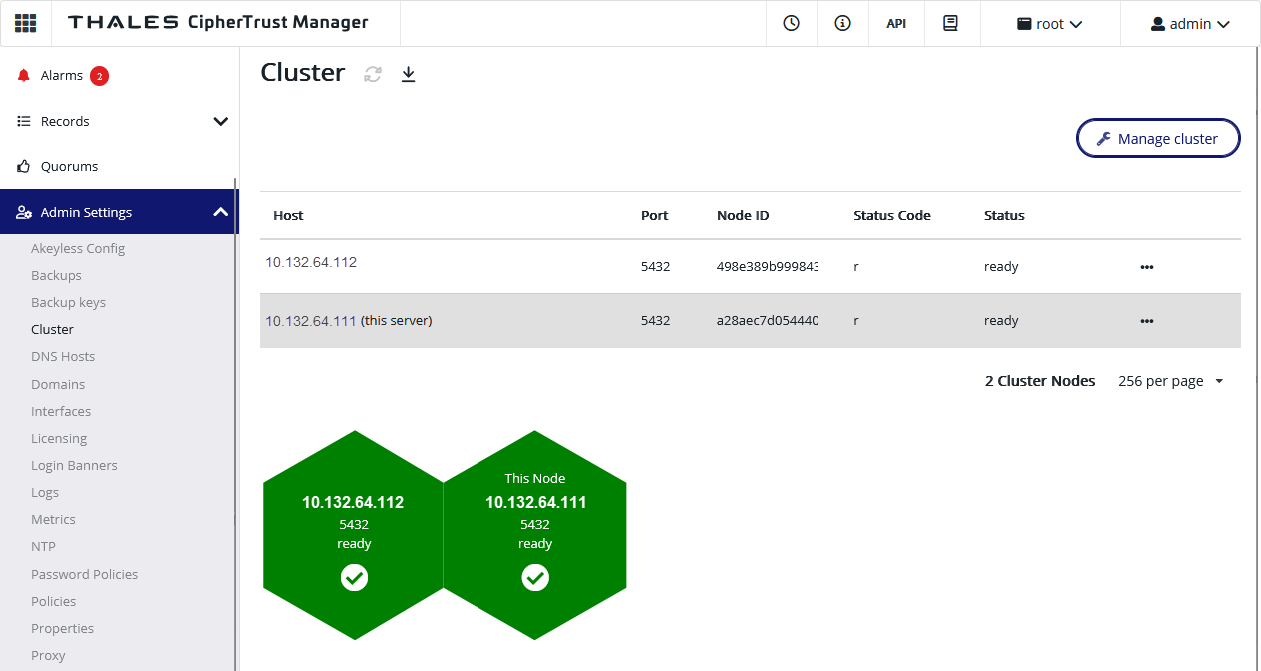
On the primary node's Cluster page, confirm that the newly added secondary node is listed as a Host and has a status of Ready, and that the nodes in this cluster are in sync (green).
Synchronization takes some minutes.
-
On the secondary node, import the backup key used by the primary server for the automatic backup schedule. For instructions, see Related topics below.