Set the time server (NTP)
You must have the correct time set on your CipherTrust Manager as this affects system functions, such as protected host registration, log timestamps, High Availability (HA) cluster synchronization, and certificate exchange. Although configuring a network time protocol (NTP) server is not mandatory, it is recommended. For HA setup, the NTP server is mandatory.
Select NTP in Admin Settings and enter an accessible time server. If the time server is not private, any public time server can be used. Make sure that the time server is accessible by CipherTrust.
Before you begin
Upload CipherTrust Manager license
Procedure
-
Sign into the CipherTrust Manager Web Interface.
-
Go to Admin Settings and select NTP.
-
Enter the host name of the NTP server.
-
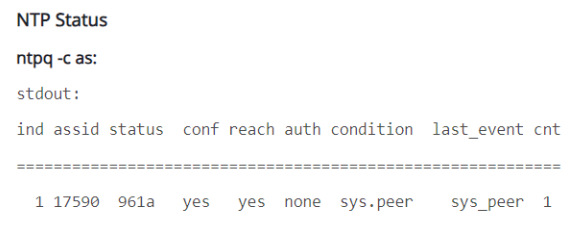
On the same page, look at the NTP server status. To view it, refresh the page.
The NTP server is connected when the column Reach shows Yes.
What to do next