Export the wrapper key
After creating the DSM wrapper key, export it from Thales DSM to an archive file. This file serves both as a backup of your encryption keys and is required for importing the keys into CipherTrust Manager to complete the key migration.
Before you begin
Create a wrapper key and get key share IDs
Procedure
-
Log on to Thales Vormetric Data Security Manager (DSM) as a system administrator.
-
For a high availability system, make sure the cluster is synchronized:
-
In Thales DSM, from Dashboard, under High availability, look at the status.
A green status indicates that both the primary and secondary servers are in sync
-
-
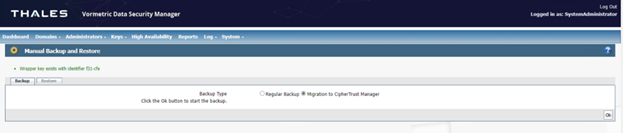
Go to System and select Manual Backup and Restore.
-
Make sure that the “Wrapper key exists with identifier xxx-xxx” shows the identifier that you created previously.
-
Under Manual Backup and Restore, navigate to Backup , and select Migration to CipherTrust Manager as the backup type.
-
Select OK.
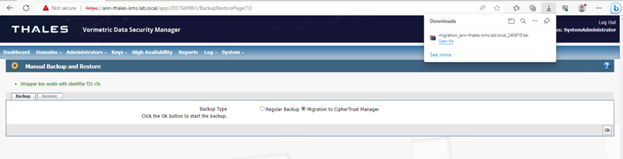
The system exports the keys into a .tar archive and saves it to the following location: C:\Users\<username>\Downloads\, where <username> refers to the currently logged-in user.
-
After a few minutes, verify that the upgrade file has been successfully saved to your Downloads folder.
The filename follows this format: migration_<hostname>_<DDMMYY>.tar
Example: C:\Users\SystemAdministrator\Downloads\migration_rs-thales4.lab.local_12062025.tar
What to do next