Create a wrapper key and get key share IDs
In Thales DSM, create a wrapper key and export it for the two custodians to an archive file. The wrapper key secures (wraps) your encryption keys for export and grants its custodians the ability to export and import keys.
A wrapper key is required for both automatic and manual exports.
Before you begin
Procedure
-
Log on to Thales Vormetric Data Security Manager (DSM) as custodian #1.
Example: SystemAdministrator.
-
Go to System, select Wrapper Keys.
-
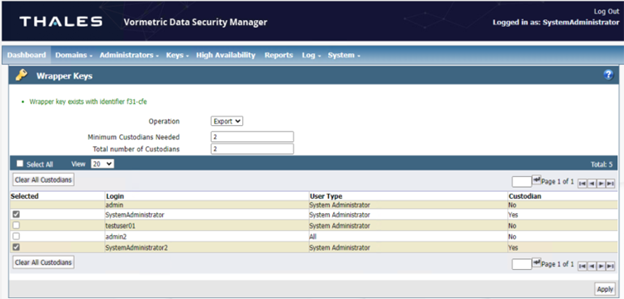
In the Wrapper Keys window, from the Operation menu, select Export.
-
Confirm the the number of custodians is set to 2.
Minimum Custodians Needed: to 2.
Total number of Custodians: to 2.
-
Under Selected, select two system administrator users to be custodians.
Example: Select SystemAdministrator (currently logged in) and SystemAdministrator2.
-
-
Select Apply.
The wrapper key and two custodian key shares are exported. The wrapper key identifier is displayed at the top of the page. Example: “f3-cfe”.
-
Take note of the wrapper key identifier.
-
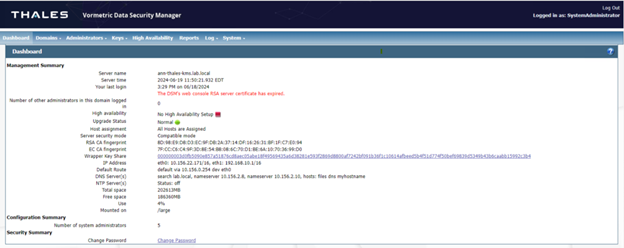
Go to Dashboard, select Show at the Wrapper Key Share value.
-
Take note of the wrapper key identifier and the wrapper key share value for Custodian #1.
-
Log on to the Thales Vormetric Data Security Manager (DSM) using the Custodian #2 user account.
For example, log in as SystemAdministrator2.
-
Go to Dashboard, select Show at the Wrapper Key Share value.
-
Take note of the wrapper key identifier and the wrapper key share value for Custodian #2.
The wrapper key identifier and two wrapper key share identifiers, one for Custodian #1, and the other for Custodian #2, are required to import the keys into CipherTrust Manager.
Example:
What to do next